

Studio 360 for Sirius (Studio 360) is an independent project by explorations360, not affiliated with, endorsed by, or supported by Hengbot. Sirius and Hengbot are trademarks of their respective owners. This kit was reconstructed by reverse-engineering the robot's API; it is neither supplied nor approved by the manufacturer.
16 September 2026 · the robot that runs hot, and the power supply that sings
Tool version at the end of the session: v2.9.2.
The starting observation is not an engineer's, it is an owner's: switched on, this robot is hot. All the time. Not after an hour of walking — all the time, including lying down doing nothing.
The first thing to undo was the word "lying". In its idle animation on the ground, all fourteen motors are working, with loads from 10 to 172 ‰ depending on the channel and a peak at 307 ‰. The robot holds its two front legs in the air there: that is not a resting pose, it is an actively held one. And the heat is in the rear shoulders, the ones carrying the weight.
We then tried to measure what it draws, and found four closed doors. The motor temperature probes return zero; there is exactly one thermometer on the whole machine, the CPU's. The "motor load" we have been displaying for months is not a measurement, it is a power set-point. The per-motor topics documented in firmware 2.3.6 no longer exist in 2.5.5. And the battery publishes a complete state message in which every field is zero, marked "not present".
The lever does exist: a motor torque service, scale 0 to 2047. The figure 2047 is what the vendor's own application sends in every one of its motion commands — which means the way back was written in advance, and therefore testable before cutting anything at all. Measured, the commanded load drops from 307 ‰ to 5 ‰. But the proof that counts is not that number: at zero torque the front legs sink back down, and on restore, the robot lifts them again.
Two things nearly made the whole operation fail, and both are instructive.
The first is a loop. From the standing station, going to rest turned into lying / standing / lying / standing, and once on the ground the robot played an idle animation. The mechanism is clear once seen: the application sends the maximum torque set-point inside every motion command. So every spontaneous animation re-arms the torque you have just cut. Autonomous behaviour has to be silenced before the robot is laid down, and given back on waking — after the torque, never before.
The second was a deduction of ours, and it was wrong.
What remained was to know whether the consumption really stopped, on a machine with no ammeter whatsoever. The robot itself supplied the instrument. It has always emitted a very high-pitched whine, which young ears find unpleasant and older ones no longer hear at all. So the test was not a silence but a there-and- back, run by the ears that can hear it: stop an action, noise; go to rest, silence; give the torque back, noise. Twice, in both directions. And it comes from the front, between the two shoulders — so from the body and not from the motors: the signature of a switching power supply, which sings louder the more current you draw from it. This machine has no current sensor, but it says its consumption out loud.
Testimony by ear depends on the age of the ear. So we wrote a measuring page, then attempted a recording with the robot's own microphone — the best-placed instrument there is. It took three attempts, and each failure left a guard rail in the script: the main microphone array is held permanently by the robot's audio player; the second codec does open at 48 kHz but its input pins are wired to nothing, which gives a capture that is perfectly open and perfectly silent; and the posture is not asked of the operator, it is read from the robot.
The result is a negative one, and it is a clean one: below 8 kHz, no sustained line appears when the torque comes back. At the relaxed threshold, the best candidate tops out at 34 % of the time against 9 % at rest, where a whine would give 100 against 0. The reason is simple and does not contradict the ear: the robot's recorder runs at 16 kHz, so it is blind above 8 kHz — precisely where a whine that adults no longer hear lives. The negative does not refute the testimony, it narrows the range where we will have to look.
The rest of the day was maintenance, and it produced its share of surprises. The LED organ, written four days earlier, had only ever run against the simulator: it carried two perfectly silent faults. The microphone stream was stored in a read-only property, so the microphone mode had never once started; and the animation loop relied on a browser mechanism that does not run in a hidden tab. Neither produced an error. Repaired, verified on the robot: twelve head LEDs and six body LEDs, one at a time.
And six pages of the kit were reachable only by typing their address by hand. They now open in a frame laid over the interface, without navigating away from anything.
What remains is how the investigation ended, and it is the simplest measurement of all.
The rule this day paid for most dearly is not a rule of reasoning. Three times, a plausible deduction led to something false, and three times a physical test set it right — the legs that hang, the whine that comes back, the hand on the robot's back. The right reflex is not to reason better: it is to look for the test that separates the cases.
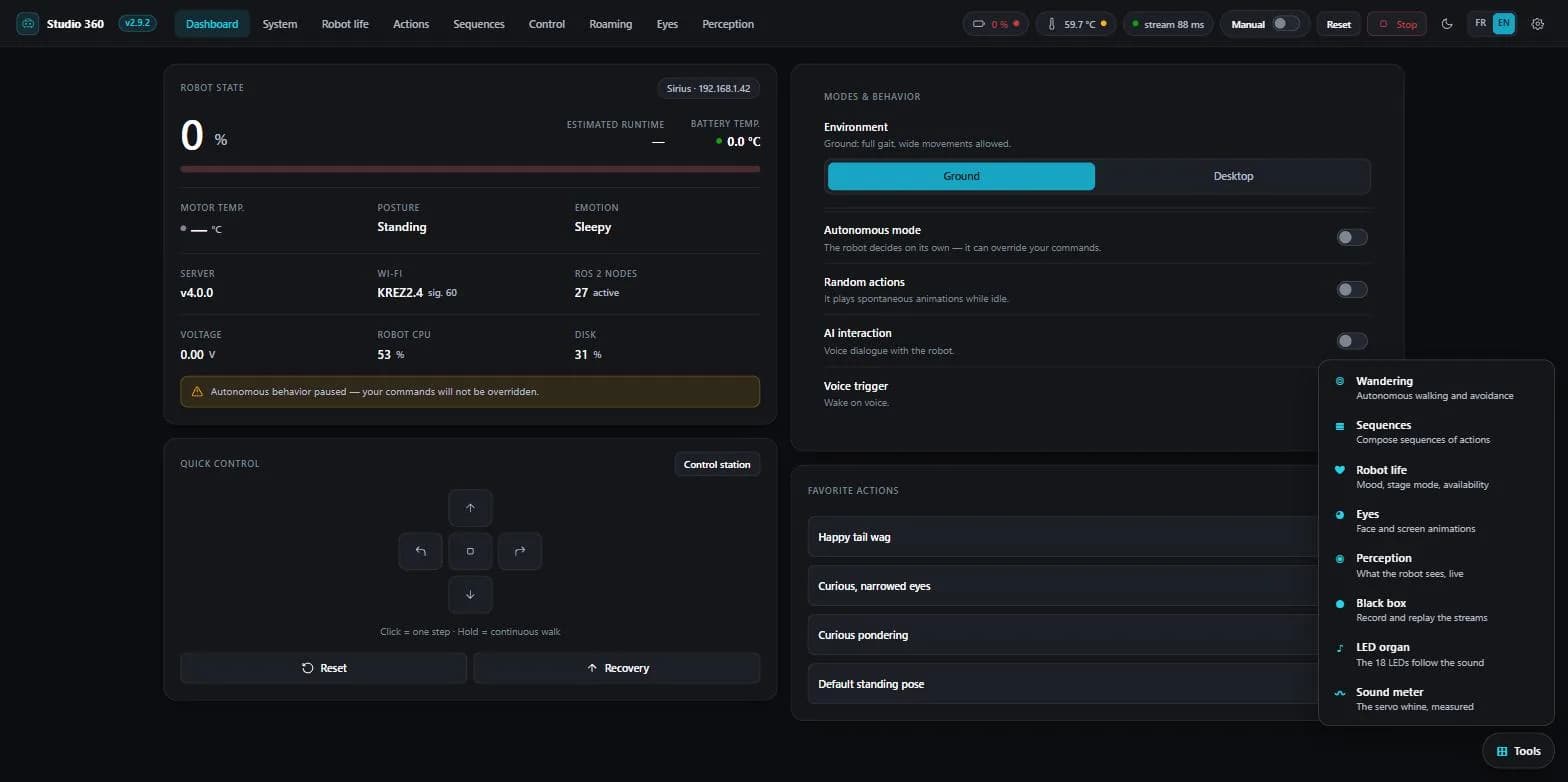
23 September 2026 · the human gesture replayed, and measured
Version published at the end of the session: v2.9.1. v2.9.2 was being written, but not frozen.
The day began with a sentence from Phil, said from memory of his machine and not from a file: "if I put him on his side, he gets up by himself". A robot that rights itself knows it has fallen. So our claim of the day before — nothing in this API reports a fall — was wrong.
This unit makes measurable what could only be judged by eye: pitch and roll. Three caveats come with it, written before the measurements rather than after. Inclination at rest is about 4°, not zero. Every reading is quasi-static: in a brisk movement the robot's own acceleration corrupts the inclination derived from gravity. And a reading costs a network round trip, so about nine per second, not a hundred. Yaw stays with the eye: with no magnetometer, the heading drifts.
It also settled a question we had been dragging along. The posture register we took for telemetry is nothing of the sort: robot tilted, pushed, lifted, the unit follows three times out of three and the register does not move by a thousandth. It is a register of set-points. It says what was asked for, not what happens.
Most of the day went to the skeleton — the vision stream that would let us teach the machine a gesture by performing it in front of it. Two recording sessions, and between them, only one thing changed: the viewpoint.
The confidence threshold we had been looking for since the previous day settled itself: the trunk sits between 0.82 and 0.92, the guessed extremities between 0.48 and 0.63, and 0.70 is the middle of that gap. We write it down for what it is — a gap observed once, not a measured constant.
In the evening the full chain closed. A human in front of the robot, a recording, an action written by our tools, dropped onto the machine, and played by the native player from the container alone, with no compilation. Seventeen seconds. The written curve looks like the recorded choreography: still, leaning one way, upright, leaning the other, crouched with the head low, back up.
It took four passes, and each taught something different.
The first announced "34 % usable measurements", which looked like a shooting fault. It was our own report comparing eight truncated seconds against a twenty-three-second session.
The second clamped one axis at 35 %, and more smoothing changed nothing — a sign that the problem was not the briskness of the gesture. Every quantity was being normalised by the shoulder width of the current frame, about 43 pixels trembling by 7 %, instead of that of the neutral pose. The noise thus injected into the vertical axis was worth 121 % of its full scale: the axis was being walked from one stop to the other by the skeleton's tremor. After the fix it goes from 78.6 to 12.2 %, pitch from 44.7 to 13.6 %, and roll does not move — 21.4 then 21.6 %. Exactly what the explanation predicted.
The third started the action at 100 % of its amplitude: the calibration on the neutral pose had been taken while the person was still walking back into place.
Then came the question that matters: does the robot really replay the gesture? The eye will always say yes, because it wants to see a resemblance. So we measured, reading the inertial unit during playback and comparing the recorded curve with the one written into the file — we know both.
Roll written was 0.254 radian, measured 0.210, correlation +0.910. Pitch 0.247 written, 0.230 measured, correlation +0.867. And the non-relation control — the same curve read backwards in time, same shape, no possible causal link — gives +0.046. Two checks could have brought the whole thing down: both axes, aligned independently of one another, peak at the same 200-millisecond lag. A physical latency, not a lucky fit.
One result arrived without being sought, and it is the most interesting of the day. An action that moves only one axis makes the unit respond on both: a pure-pitch file makes the read roll vary by 0.148 radian, more than the pitch itself. The mixing is systematic, the two responses being orthogonal at 94°, so it is a stable relation and not noise. And a probe that sends no command at all ruled out half the hypotheses: a tilt imposed by hand, purely in pitch, reads on the right axis to within 2 %. The unit reads correctly. So the mixing comes from the way the robot executes a pure-axis set-point, or from the file's axis names not designating the body's axes. A property of the machine, documented nowhere.
The session ended on a check, and on what it revealed. Every page served by the kit must have an entry point in the interface — otherwise it exists without being reachable. Written, it immediately reported that the main interface knew neither the black box, nor the organ, nor even the page that lists the tools. Three pages shipped, none reachable except by typing its address. That is what held the version's publication back for three days, and it was a check that said so, not a trial.
32 September 2026 · the robot plays our actions, and a conclusion drawn too wide
Version published at the end of the session: v2.9.1. v2.9.2 was being written; we decided to keep it warm and stack a little more before freezing.
We wanted to know whether we could write an action for this robot — one of those files the vendor produces with its own tool and the robot plays. The answer is yes, and it went further than we had hoped.
The first trial is a round trip: take two official actions apart, put them back together, and compare byte for byte. Both come out identical. Then a container written from scratch, which the very library the vendor's tool depends on demultiplexes without complaint. Then the vendor's tool itself, which compiles our container and produces a binary file identical to its own.
And finally the question we had not dared to ask: what happens if you drop the container without the compiled file next to it? It is read, demultiplexed and played. The witness — six seconds of pure green, then blue, then magenta — returned the exact sequence, identical with and without compilation. The slow path is alive, and the compiled file is indeed what the vendor says it is: an optimisation, not a condition.
Two corrections along the way, to the document we had written the day before: the format's padding is made of spaces, not zeros, and the header is that of a known library, constant, and therefore reproducible to the byte.
A third correction concerns our own sales pitch, and that one deserved writing down before it reached the site. We had been repeating that this tool was the remaining path to the robot's eyes. It is not: the eye layer has been orphaned since an earlier version, and a flawless interface track will change nothing. What the tool actually unlocks is motion, LEDs and sound. That is plenty, and there was no reason to sell it as something it is not.
The afternoon produced a method error we turned into a rule.
The trial was run that same evening, and blind, because a command whose expected effect is subtle is exactly the case where you see what you hope for. Four real commands and four null ones, shuffled: four detected out of four, no false positives. Then six trials on the sign, all correct. The head responds too, but at 0.30 radian — imperceptible at 0.20, which puts our kit's default clamp under suspicion rather than the command.
The rest of the day went into what would become v2.9.2. A black box that records the streams the robot pushes, at the exact point where they reach the browser, replays them without ever talking to the robot, and lets you cut an extract into a new file without rewriting the original. And an LED organ that makes the eighteen diodes follow sound.
Two amusing measurements came out of it. The LED channel only accepts the head and the body: no motor is reachable through it, which is good news for safety. And the robot deduplicates identical LED frames — 291 frames giving 285 events on a vendor action, and 600 frames giving three events on our three-pure-colour witness. The same mechanism, measured at both its extremes.
One last measurement, for the tool meant to teach the robot a human gesture: on its own actions, the fastest axis the vendor allows itself moves by 0.012 per frame. Our first attempt was running at 0.061, five times more — not out of excessive zeal, but simply because a human gesture resampled to a hundred frames per second asks the servos for a speed the vendor never asks of them. So the tool clamps every axis to the maximum observed in the vendor's own work, and counts the clamped frames.
41 September 2026 · the sensor switched off, and the face switched on
Tool version at the end of the session: v2.9.1.
The session opens on bad news. Roaming no longer works, and it is not our code: firmware 2.5.5 switches the rangefinder off at boot. We walked back up the chain link by link before admitting it, because a silent sensor first looks like a reading bug. Every link was innocent: the network bridge subscribed to the right topic, the node publishing at 245 Hz without a single error, the serial link at 250 frames per second. The cause was written in plain text inside the low-level driver binary, in Chinese.
Decision taken: we do not repair, we detect. The Roaming tab queries the robot on load and shows a dated banner when the sixteen channels come back invalid, then disables "Start". The walking code stays untouched. And the word we kept is "suspended", not "obsolete": the function is not stale, it would work again as-is if the vendor switched the sensor back on. We do not rewrite the history of a function that worked.
The good news came from the opposite side, the one we had filed away. We had published, with proof, that the eyes are not drivable over the UDP channel. That result still holds. But the screen exposes two undocumented ROS services that accept an arbitrary absolute path: a GIF built on the PC, dropped into the robot's temporary folder, loops on its face. Trial successful the same evening.
A pleasing confirmation, too: the twelve head LEDs our tool has addressed since v2.8.5, where the vendor's public editor drives only two, are described identically in its internal documentation. We were not merely ahead of its public tool, we were level with its internal one.
And finally a trap that caught us: the route that pauses the behaviour, called without the expected field, puts the robot into pause. An unknown key is ignored, and the default value is "paused". We meant to resume the behaviour, we stopped it.
531 August 2026 · the robot tracks a hand, and a lesson in method
Tool version at the end of the session: v2.8.7.
The node we called face_tracker does not only track faces. It handles two targets, and switches between them through an internal command on its control topic. So the robot tracks a hand with its own kinematics, computed on board: smooth and latency-free, which no PC-driven tracking can match, since the loop never crosses the network.
The tool exposes the toggle as two switches in the Vision tab, under the Detection master. The hand takes priority, the face takes over when it leaves the frame. On the machine side, the command goes through a small persistent ROS node held on board by a single SSH connection: switching is instant and nothing is installed permanently on the robot. It does require a passwordless SSH key.
So we removed the "unproven command" warning from the interface and from this documentation, and put the doubt where it belongs: any claim of a missing node coming from the old reading must be re-checked before being repeated.
630 August 2026 · moving to 2.5.5, and a mistake of our own
Tool version at the end of the session: v2.8.6.
The robot moves to firmware 2.5.5. Three things came out of it, including a correction that is entirely on us.
CPU temperature does exist. The top-bar chip showed a dash because it was reading the motor probes, which are silent on this firmware. The robot actually publishes its system temperature on its telemetry stream, around 57 °C while running. The System tab, for its part, declared it "not available". That was wrong, and it is fixed in both places.
Face tracking is confirmed, and it works independently of Detection. It was the last vision command whose effect we did not dare guarantee.
The kit was retested end to end on 2.5.5: motion, LEDs, API and network commands intact, no regression. That is the check that allows compatibility to be published rather than assumed.
The vendor's changelog gains six betas along the way, from 2.5.1 to 2.5.5, plus a 2.4.10. The most consequential is 2.5.4, which opens the robot to remote access over MQTT and WebRTC: it stops being a strictly local machine.
729 July 2026 · the LEDs, diode by diode
Tool version at the end of the session: v2.8.5.
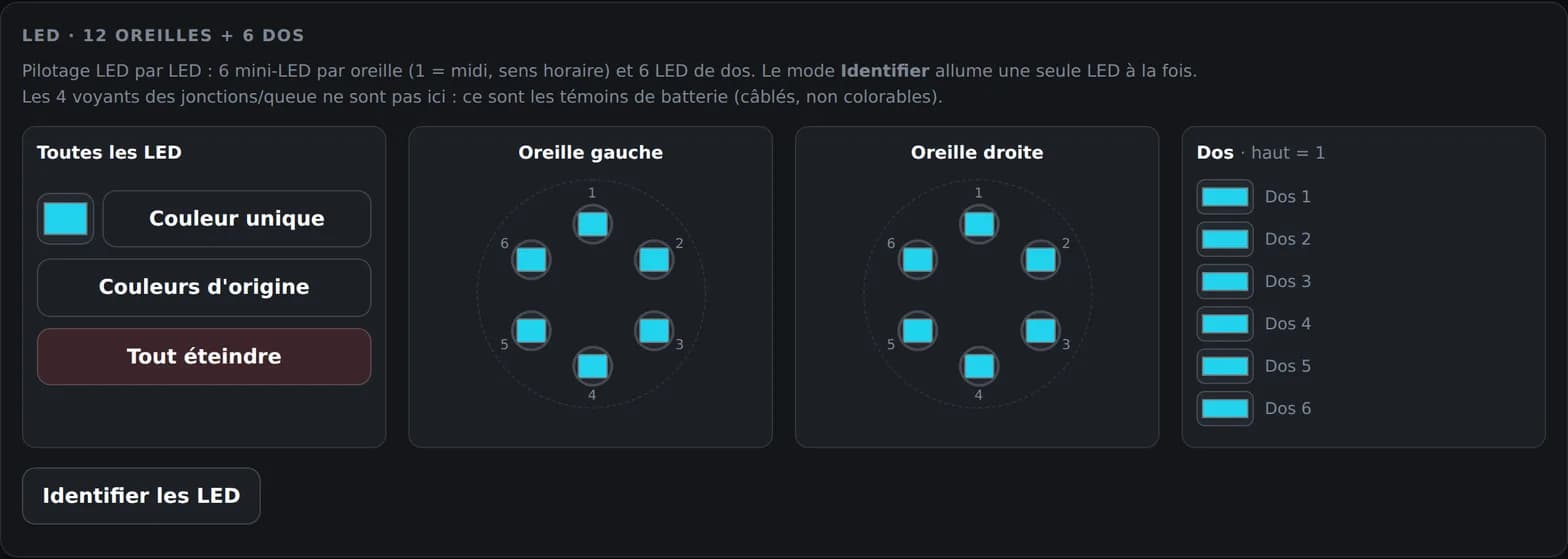
We thought we were done with the LEDs: eight points, two on the head, six on the back. Pushing the control further, it turned out that each of the two head points is in fact an ear of six mini-LEDs in a ring, addressable one by one. The head therefore goes from 2 to 12 channels, and the real count is eighteen, not eight. Marker 1 sits at twelve o'clock, then you go clockwise.
To work out which diode carries which number, an Identify mode lights only one at a time. It is the only reliable way to map a ring whose order you cannot see from the outside.
Second fix of the session, and a more embarrassing one: the mood plot had been wrong from the start. Valence, arousal and satiety are published by the robot on a 0 to 100 scale, which our cursor interpreted differently. As a result it stayed stuck at the top of the plot whatever the machine's real state. Fixed, it finally drops to the bottom when the robot is lying down and quiet.
Third point, a confusion that cost us a few attempts: the Reset and Recovery buttons did the same thing. These are two distinct mechanisms in the robot, standing up on one side, post-fall recovery on the other. They now sit on two separate calls, and we finally understand why a robot fallen on its side would not get up when asked to stand.
On the roaming side, the avoidance node moves to v16: it stops as soon as a void is merely suspected, and detects a sharp edge on a single zone, which catches the diagonal approaches the previous version let through.
829 July 2026 · seven tabs, and the screen solved
Tool version at the end of the session: v2.8.4. Two days of work on the real machine, condensed here.
The tools built along the way stop being separate pages: they become the seven tabs of a single interface. This is the moment the tinkering turns into a tool.
Three findings verified on the machine
Volume is a ROS parameter of the audio node, set through a parameter command we captured on the vendor's official interface. The LEDs are reachable only through the UDP 8768 channel, the only known route, neither WebSocket nor REST. The head screen is driven by ROS services dedicated to animations and messages.
All three results now live in the developer documentation, section "Volume, LEDs, screen". They do not need to be read here to be used.
A negative result, but a demonstrated one: the eyes will not answer
We tried to drive the eyes. The UDP server does understand the matching keys and republishes them onto a dedicated topic, but nobody consumes that topic any more: the subscriber count is zero. The eye layer is handled inside the display node, and the screen service parameters confirm it.
What "Robot life" gathered at that point
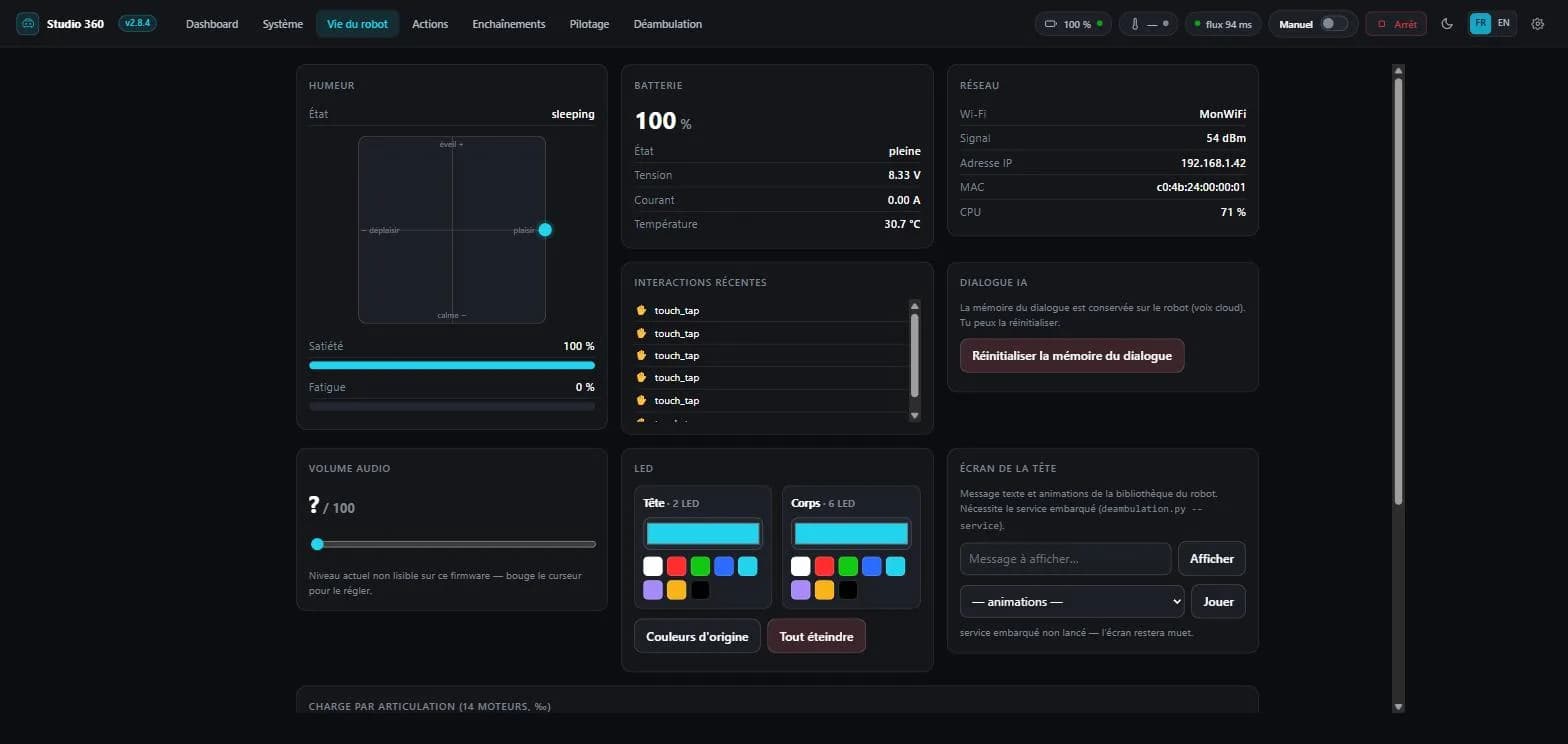
The tab brings together what the machine says about itself: its mood as its own emotion engine computes it, and those are the values that explain why it eventually lies down on its own; the audio volume; the LEDs, at that point in two groups only, head and body, with a palette per group; the head screen; battery, network, the load of all 14 motors, touch interactions received, logs, and the dialogue memory.
Sequences appears in the same version: a behaviour editor where you line up animations, randomly drawn groups, pauses and roaming blocks. The new idea is the group: you describe a behaviour, not a fixed list.
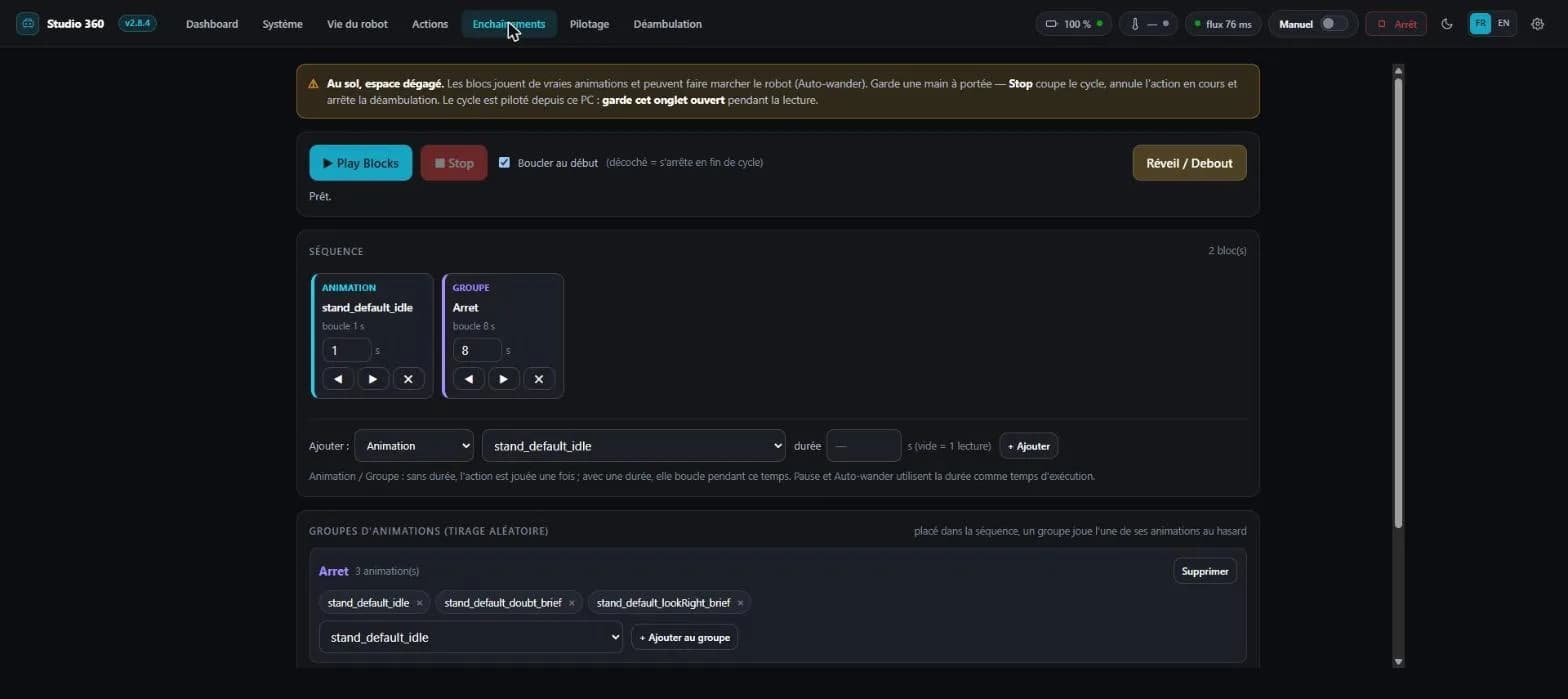
A mistake caught after the fact
The delivery announced the right version in its heading, but the kit sheet just below still described the previous one: name, size, hash and file count. Five other places carried the same stale version, including the download button. The automated check had seen nothing, because it only looked at one shape of line.
927 July 2026 · roaming, then on board
Tool versions: v2.8.2 then v2.8.3.
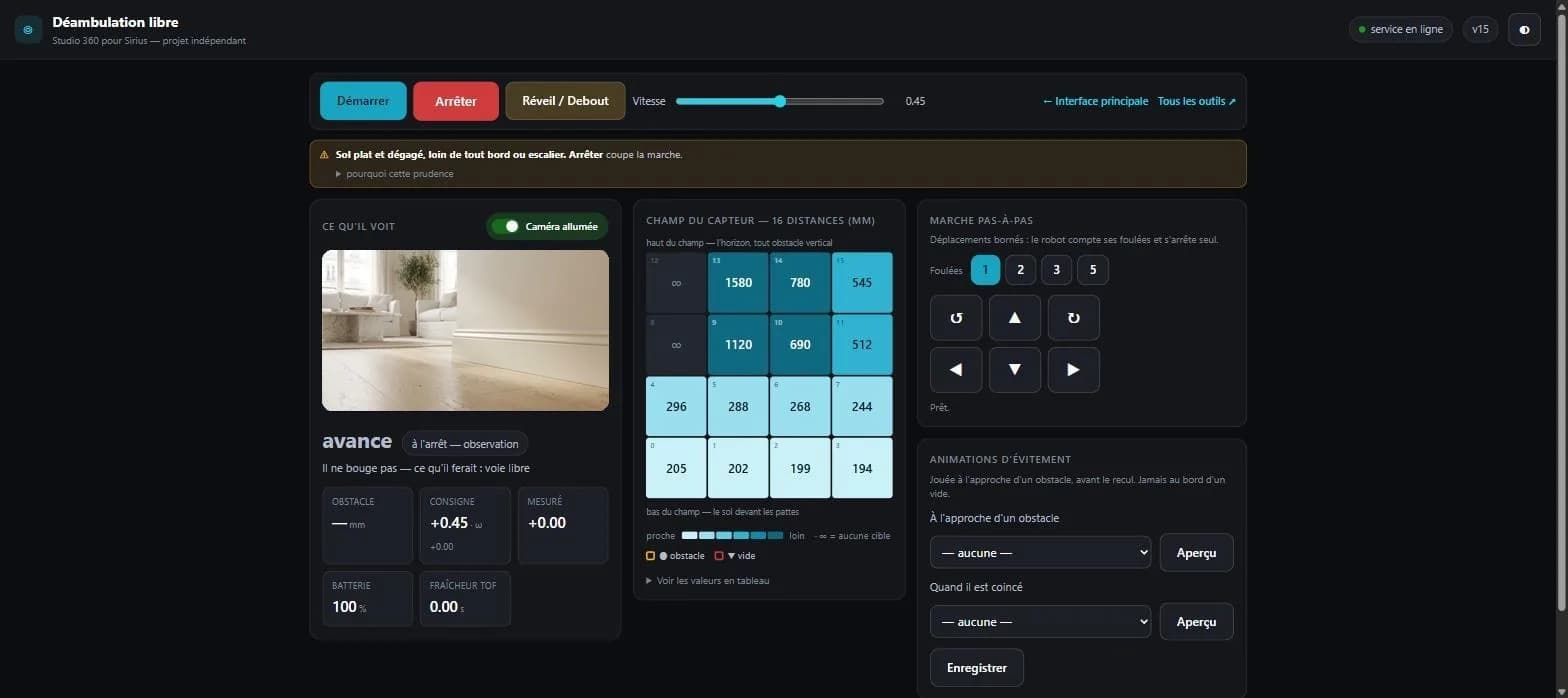
v2.8.2 adds a Roaming tab: the robot walks around on its own, avoiding obstacles, while the screen shows what it perceives. You see the distance sensor field live, a 4 × 4 grid, sixteen distances in millimetres coloured from nearest to farthest, and the zones shouting "obstacle" or "void" ringed with a halo. Next to it, the robot's decision and its reason, in plain words.
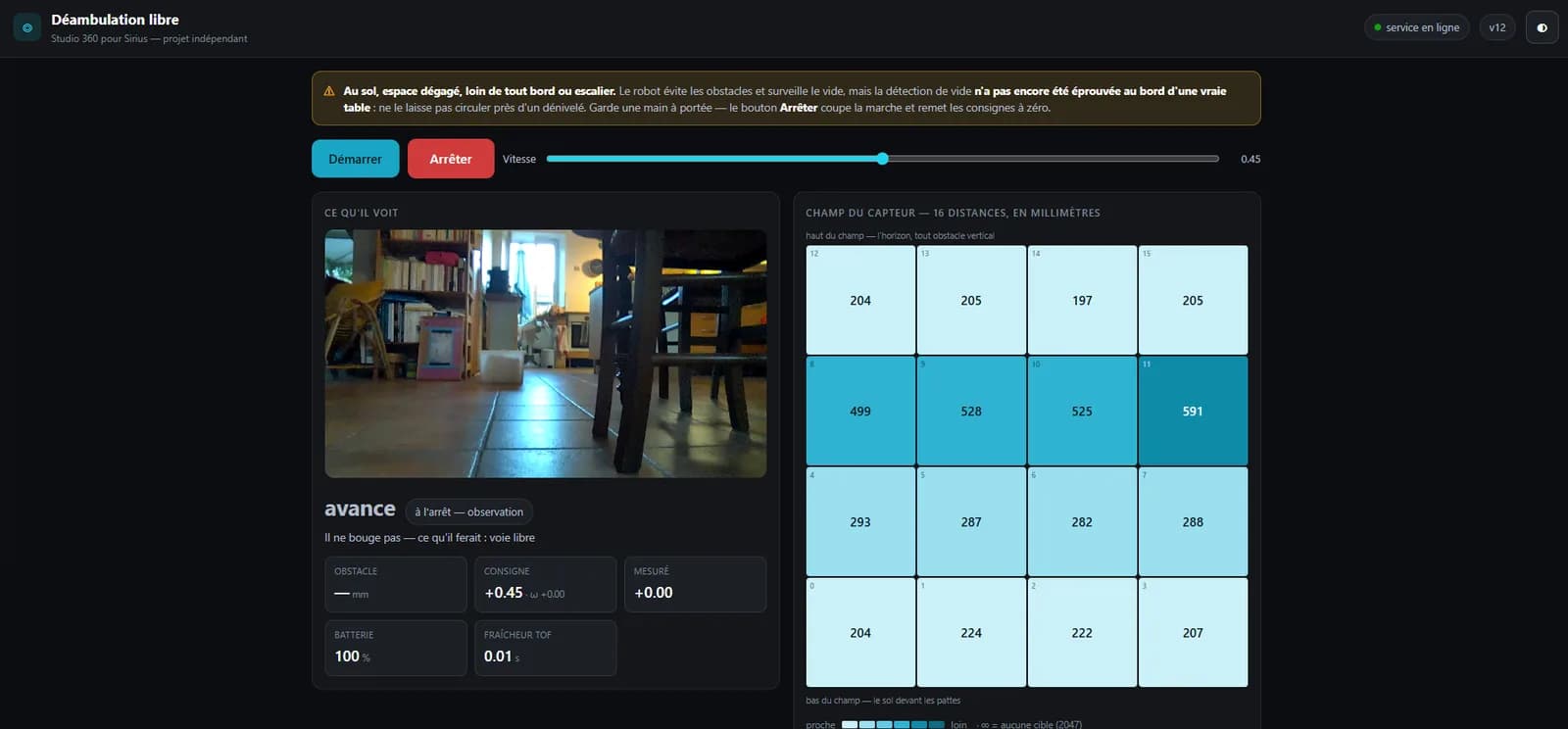
The point that took the most fumbling: the distance sensor only exists on the on-board ROS graph, never on the WebSocket channel. The avoidance loop therefore has to run on the robot, not on the PC. That is an architectural constraint, not a choice.
v2.8.3 draws the consequence: the node ships with the kit, one copy command drops it onto the machine, and the tab becomes fully usable by a third party. Until it is deployed, the tab explains what to do rather than staying silent.
1027 July 2026 · mobile, and the flaw worth telling
Tool versions: v2.8 then v2.8.1.
v2.8 makes the tool fit in your hand: the interface installs on a phone like an app, with its manifest, its icons and iOS full screen. Driving the robot while following it around the room becomes possible. The bridge itself stays on the machine; the phone is just one more screen opened onto it.
v2.8.1 therefore adds a network mode: the bridge listens on the local network, the console window prints the address to type on the phone, and the interface derives its address from the page it was served from instead of hard-coding it.
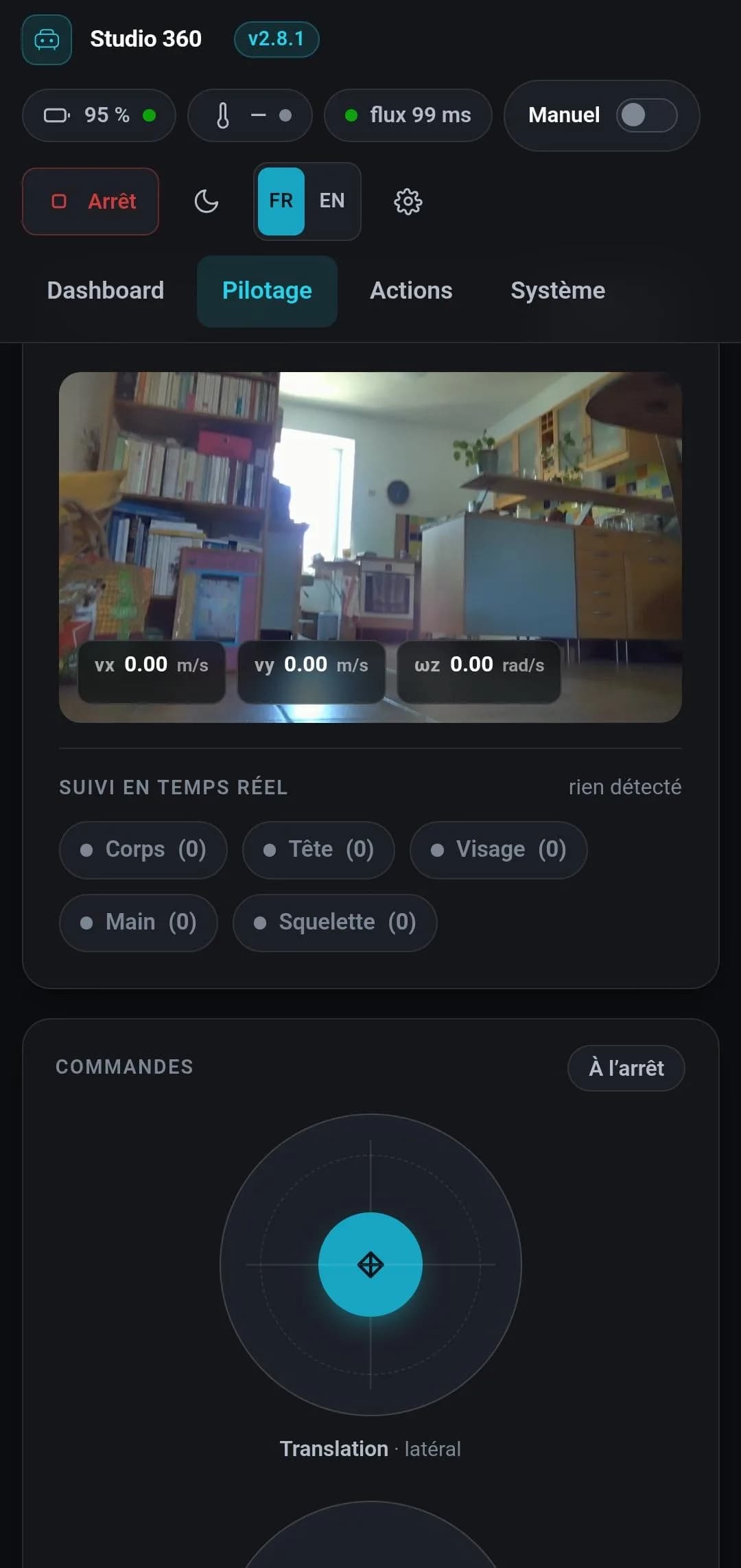
One deliberate difference from the vendor's official client dates from this session: it disables zoom, we do not. Buying a tidier look by killing pinch-to-zoom costs accessibility.
1127 July 2026 · the System tab, and the honest gaps
Tool version: v2.7. This is also the version where the tool is renamed and becomes Studio 360 for Sirius.
The System tab is a diagnostics view: live vision counters, the load of all 14 motors and the state of the cut-off, machine metrics, and a thermal panel that set a writing rule for the rest of the project.
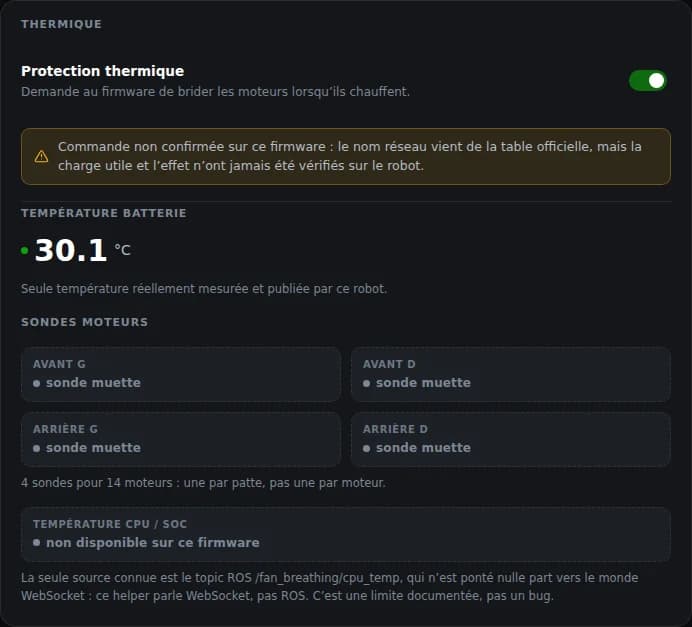
Another fix from this session: the "autonomous" switch in the top bar had only ever changed what was displayed. It is finally wired to the bridge's real route.
1226 July 2026 · early days
Tool versions: up to v2.6.
The first sessions went into mapping the protocol and building something to question it with: the two joysticks, the camera view, the robot's action library with names translated from Chinese, motor telemetry and the cut-off.

v2.6 brings a subtlety that took time: the posture selector reflects the robot's actual state, including when autonomous behaviour acts on its own. The posture is inferred from the action being played, flagged as inferred, and nothing lights up until it is known.