

Studio 360 for Sirius (Studio 360) is an independent project by explorations360, not affiliated with, endorsed by, or supported by Hengbot. Sirius and Hengbot are trademarks of their respective owners. This kit was reconstructed by reverse-engineering the robot's API; it is neither supplied nor approved by the manufacturer.
1In short
If your Sirius accepts your commands and still does nothing useful, the answer is almost always in this list. Each of these traps has its own symptom: a robot that acknowledges and marches in place, a command that comes back as "Unknown request_type", a gait deliberately limited out of the box, an obstacle that does not exist, a tilt reading that rotates on its own.
- The speed unit: commands are normalised to [-1, 1], they are not m/s. Sending
0.15asks for 15 % of full travel, not 0.15 m/s. - Command names: on the WebSocket wire they are uppercase. The lowercase names found in the binaries are internal handlers, not what travels.
- The robot mode: out of the box the robot is in
desktop, a mode that deliberately limits gait so it will not walk off a table. - Where the sensor sits: the ToF is not in the head but under the neck, and it sees its own chin. Without knowing it, you take the robot itself for an obstacle 191 mm away.
Two other classic causes of an inert robot are not protocol traps but rules of conduct: action priority, which must be raised to 5 so the autonomous behaviour does not override you, and sleep, which you only leave by playing the stand-up action. Both are covered in Making the robot walk.
The most unpublished topic here is the ToF sensor: its actual position, its grid, its units and its self-occlusion appear nowhere else, and they are what makes the free cliff detection described below possible.
2What the robot actually is
Under the shell, the Sirius is a small Linux computer (D-Robotics RDK X3, around 5 TOPS) running ROS 2 Humble. Its entire behaviour is a set of ROS 2 nodes talking to each other. The application lives in /root/sirius_ros2 and starts at boot through ros2_launch.service.
There are two levels of control, and the choice matters for mechanical safety.
| Level | What | Use it for |
|---|---|---|
| High level | WebSocket :8765, ROS 2 services and topics | Walking, playing an action, reading gestures and vision. Goes through the robot's own protections (kinematic modes, per-action torque, balance). |
| Low level | UDP :8768 and up, Play_Keyframe packets | Streaming poses frame by frame, the route used by the Blender add-on. Bypasses those protections: only use it once you know the joint limits. |
The nodes that actually run
ros2 node list returns 31 entries, two of them duplicates (core_api_node and camera_publisher_node appear twice): 29 distinct nodes. The ones that matter:
core_api_node: the WebSocket server on:8765, the one answering all 59 commands.sirius_motion_control_node: motion. It consumes/gait_generation_trot/cmd_veland publishesfiltered_velocity, along with the/kinematics/*topics.behavior_engine_node: autonomous behaviour, emotions, decision tree. It absorbed what the 2.3.6 package split betweenrobot_behavior_controllerandemotion_manager.perception_bridge_node,face_detection_bridge,camera_publisher_node: visual perception.state_sensor_tof_node: the distance sensor, subject of a whole section below.imu_onbody,internal_sensor_battery_onbody: IMU and battery.action_player_node: plays the named actions in/root/material/actions/.lvgl_gui_node: the head screen, touch included.sirius_gamepadandxbox_bluetooth_gamepadon topic/joy: Xbox controllers are supported natively, which the documentation never mentions.- And the rest of the machinery:
lifecycle_manager_node,ota_update_node,network_config_node,sync_manager_node,motor_torque_controller_node,fan_controller_node,modbus_driver,wmix_audio_player_node,ai_interaction_node,character_state_node,user_data_manager,user_interface_udp_server_node,production_test_node,sirius_bt,ble_control_server,robot_led_controller_node.
Official spec sheet
- 250 x 130 x 250 mm, 960 g, 300 g payload.
- Stated battery life 45 to 50 min in active use.
- Stated top speed 0.4 m/s (see below: three contradictory figures are in circulation).
- No sensor is listed in the Specifications section. No ToF, no IMU, not even the camera.
3Versions and firmware
Knowing which version you are on conditions everything else: between the source package the vendor ships with its tools and the firmware actually installed, the architecture changed.
| Item | Value | How we know |
|---|---|---|
| Our robot's firmware | 2.5.5 beta, installed 30/08/2026 | Verified: update performed, then motion, LEDs and API re-checked (previously 2.5.0, from 23/07/2026) |
| Latest stable release | 2.4.8, 17/07/2026 | Verified: RELEASE channel on the same page |
| Versions in the catalogue | 13 beta, 2 stable | Verified: reading of 30/08/2026 in the Update Center |
| On-board API | Sirius Core API 4.0.0 | Verified: announced by the robot in server_info at handshake |
| Source package shipped with the OTA tools | 2.3.6 | Verified: older than the installed firmware, and the gap is documented by the vendor itself |
| App build quoted in the official documentation | 240726 | Documented: likely a July 2024 build, which dates the documentation |
What the changelog taught us
- 2.5.5, 3 August 2026: hand bounding-box recognition added to vision, plus a character-rule debugging page and a state-change API in the behaviour tree. What that detection does, and above all what it does not do, is measured in vision and gestures.
- 2.5.4, 1 August 2026: remote control. Pairing and network provisioning over QR, SoftAP or Bluetooth, remote voice over WebRTC with a TURN server, and MQTT for wake-up, action acknowledgements and online status. In other words, the robot stops being a strictly local machine: it becomes reachable from outside the home network. Worth knowing before leaving it powered on.
- 2.5.2 and 2.5.3, 31 July 2026: a behaviour tree editor is added, then tree functions are exposed to the web client; the head screen gains long-press for the menu and a tap on the skull to return home.
- 2.5.1, 27 July 2026: the low-level kinematics module is moved to the low computer, and self-balancing is introduced into the gait.
- 2.5.0, 23 July 2026: "removed behavior and emotion nodes, merged into a behavior tree driver node". That is the exact explanation for the mismatch with package 2.3.6.
- 2.4.7, 2 July 2026: switch to WebRTC for web video streaming, and addition of human skeleton detection. So the documentation calling the camera "unavailable" is not wrong: it predates this.
- 2.4.7 and 2.4.9: swipe up unlocks the screen, swipe down puts it on standby, described as a "wake gesture". That settles a long open question, see ground versus desktop mode.
- 2.4.6, 10 June 2026: torque overload protection added to the low-level firmware. One more net, beneath the joint clamps and beneath any software cut-off.
- 2.4.5, 3 June 2026: "API interface protocol updated". This is probably where the uppercase protocol described on this page comes from, and the divergence from the API the vendor documents.
Reading the version from the robot, if you prefer a shell to the console:
ssh root@<ROBOT_IP>
source /opt/ros/humble/setup.bash
source /root/sirius_ros2/install/setup.bash
export RMW_IMPLEMENTATION=rmw_cyclonedds_cpp
[ -f /root/cyclonedds.xml ] && export CYCLONEDDS_URI=file:///root/cyclonedds.xml

ros2 topic echo --once /esp32/firmware_version   # microcontroller version
ros2 topic echo --once /ota/status # update system stateThe vendor console
Its navigation bar lists nine tools, several of them documented nowhere: Material Manager, Inner World, System Update, Node Management (ROS node management, with a log since 2.4.5), Gait Debug, Group Dance, Net Debug, Behavior Tree and Timeline Editor. A firmware rollback is available there too. We only explored two of them: the rest are open leads, not established facts.
4The seven communication channels
The robot exposes seven distinct entry points. The WebSocket is the main one: it pushes state continuously and answers requests. But the one that matters most to a developer is the last in the list.
| Channel | Address | Role | Status |
|---|---|---|---|
| WebSocket | ws://<IP>:8765?audience=web | Main channel: pushed state and request/response | Verified |
| Video WebSocket | ws://<IP>:8766 | WebRTC camera signalling, no URL parameter | Verified |
| REST | http://<IP>:8088/api/v1/… | AI configuration, credentials, skills, logs | Verified |
| UDP | <IP>:8768, the only open port | Play_Keyframe pose streaming, the Blender route, and the only known way to the LEDs | Verified |
| MJPEG | http://<IP>:8080/video_stream | Plain image stream, alternative to WebRTC | To confirm, credit dspeers |
| SSH | root@<IP>:22 | ROS 2 access and deployment | Verified |
| ROS 2 | on board, RMW CycloneDDS | 29 nodes, around 130 topics: the only access to the sensors | Verified |
The ?audience=web parameter appears in the official web interface URL. Connecting without it works, but there is no reason to diverge from what the robot itself does.
WebSocket envelopes
// handshake received on connect
{"type":"event","event_type":"connection_info",
 "data":{"client_id":30,"status":"connected",
   "server_info":{"name":"Sirius Core API","version":"4.0.0",
     "architecture":"Service-based",
     "capabilities":["play_motion","status_monitoring","factory_test","ota_update"]}}}

// request
{"type":"request","request_type":"<NAME>","request_id":"<id>","data":{}}

// response
{"type":"response","request_id":"<id>","success":true,"code":"ok","data":{},"error":""}

// heartbeat, sent by the client
{"type":"ping","data":{"timestamp":0}}Error codes seen in the wild: invalid_request, not_found (with an "Unknown request_type" message), invalid_argument, service_unavailable. Probing an unknown command name has no effect on the robot, so the API can be explored safely.
The pushed event stream
| Event | Rate | Payload |
|---|---|---|
gait-trajectory | 10 Hz | filtered_velocity: what the gait generator actually applies |
motor-load | 1 Hz | 14 motor loads, range ±1000, unit is PWM per mille |
motor-temperature | 1 Hz | 4 legs, but returns 0 on this firmware (probes are silent) |
battery-status | 1 Hz | percentage is a 0 to 1 ratio, plus voltage, current, temperature |
emotion-update | 1 Hz | emotion state, valence, arousal, satiety, fatigue |
behavior-status | 1 Hz | active behaviour tree, intent, recent events (including head taps) |
vision-detection | ~30 Hz | detections and skeletons, see the vision section |
system_metrics | 1 Hz | CPU load, CPU temperature, core count, memory, disk, uptime, Wi-Fi signal, processes |
network-status and hotspot-status | on change | link and access-point state |
lifecycle_update | ~0.1 Hz | every ROS node and its state |
Eleven event types in all, pushed without being asked as soon as you connect. It is the robot's most complete source, and by far the easiest to use: one open channel, and everything arrives.
5Connecting to the robot
Finding its IP address
- On the head screen, Network menu.
- From your router's lease list.
- Through the robot's hotspot mode: SSID
sirius_xx, passwordhengbot123(published by the vendor in its own manual), gateway192.168.233.1.
Your machine and the robot must sit on the same network. The vendor's debug interface is a page hosted by Hengbot, not by the robot: http://8.163.38.44:8082/connect?robot=<ROBOT_IP>. It then opens a WebSocket straight to your robot on :8765. It gives you the virtual joystick, action playback, vision and autonomous mode. It is the fastest way to confirm everything responds before writing a single line of code, and it is that test which put us on the trail of normalised speed.
SSH access
ssh root@<ROBOT_IP>

# load the ROS 2 environment, otherwise no node is visible
source /opt/ros/humble/setup.bash
source /root/sirius_ros2/install/setup.bash
export RMW_IMPLEMENTATION=rmw_cyclonedds_cpp
[ -f /root/cyclonedds.xml ] && export CYCLONEDDS_URI=file:///root/cyclonedds.xml

ros2 node list      # 31 nodes
ros2 topic list # around 130 topics6The REST API: what the vendor documents, and what it ships
Alongside the WebSocket, the robot serves a REST API on http://<ROBOT_IP>:8088/api/v1. The vendor publishes its full specification inside the bundle of its own console. We took it at its word and tested the routes one by one, on the machine.
The fourteen routes, tested live
| Route | What the machine answers |
|---|---|
GET /ai/character | 200 — the active character sheet (MBTI, background, persona) |
GET /ai/credentials/status | 200 — status of the ASR, LLM and TTS blocks |
GET /battery/status | 200 — the richest route, and the most treacherous |
GET /battery/charging | 200 |
GET /motor/status | 200 — but temperature only, not motor state |
GET /motor/temperature | 200 — 4 leg probes, silent (0) |
GET /motor/mode | 503 "Motor mode data not yet received" |
GET /sensor/imu | 200 — orientation as a quaternion, where the spec announces Euler angles |
GET /vision/faces | 200 or 503 depending on whether a face is present |
GET /vision/gestures | 200 — the route is served, but nothing feeds it |
GET /action/list | 200 — 184 actions measured on 2.5.0, 224 since 2.5.5, with torque and official flag |
GET /action/status | 200 |
GET /transform/status and /head | 200 — 6-axis body, 4 feet, head |
GET /ping, /logs/, /skill/config | 404 — do not exist on this firmware |
Three measured traps
- The envelope is not the one in the spec. The robot answers
{code, data, message, success}, while the documentation announces astatusfield that does not exist. Any code written from the spec breaks on the first call. /motor/statuspromises more than it delivers. Announced as "all 12 motor detailed status", it returns temperature only, from four silent probes. Incidentally, the robot has fourteen motors, not twelve.- The battery reads wrong. The
chargefield is a capacity in amp-hours, out of 2.25 Ah total; the percentage ispercentage. Confusing the two gives you a perfectly healthy robot apparently at 2 % battery.
On the vision side, the measured frame gives a 640 × 360 image, with class_id, class_name, confidence and a rect{x, y, width, height} — again a different structure from the specification.
7Speed is normalised, not in m/s
The linear_x, linear_y and angular_z fields expect a value in [-1, 1]: a fraction of full travel, not metres per second. The forward key in the official interface simply sends linear_x: 1.
{"type":"request","request_type":"gait_control",
"data":{"linear_x":1,"linear_y":0,"angular_z":0}}Sending 0.15 while thinking you are asking for 0.15 m/s actually asks for 15 % of top speed: the stride collapses and the robot walks on the spot. Measured orders of magnitude:
| Command value | Observed behaviour |
|---|---|
| 0.10 | marches in place |
| 0.45 to 0.50 | walks properly |
To convert a real speed into a command value, using the operating envelope read off the robot: linear_x = vx / 0.24 forward, vx / 0.16 backward, linear_y = vy / 0.20, angular_z = wz / 1.20.
The proof, on the ROS 2 side
input  : /gait_generation_trot/cmd_vel           geometry_msgs/msg/Twist
return : /gait_generation_trot/filtered_velocity geometry_msgs/msg/Twist

command vx=+0.50 -> measured vx=+0.500 (ratio 1.00)The command value comes back unchanged on filtered_velocity, yet 0.50 exceeds the robot's declared top speed. So it cannot be metres per second. filtered_velocity is the arbiter: it reports what the generator really applies, and lets you tell "the robot refuses" apart from "you are asking for too little".
Three contradictory top speeds
| Source | Stated forward speed |
|---|---|
| Official spec sheet | 0.4 m/s |
| WebSocket API documentation | 0.28 m/s |
ros2 param dump on the robot | 0.24 m/s |
The last figure governs actual behaviour, since it comes from the parameters loaded by the control node. Full envelope read on the machine: forward 0.24 m/s, backward 0.16 m/s, lateral ±0.20 m/s, rotation ±1.2 rad/s, pitch and roll ±0.524 rad. The joint_clamp_enabled and ws_clamp_enabled guards are active: an out of range command is clamped, not driven into the hard stop.
8Command names are uppercase
This is the main trap of the WebSocket protocol. The wire uses uppercase keys, for instance BEHAVIOR_SET_PAUSE. The lowercase names you find while digging through the binaries, such as set_behavior_pause, are the internal handlers, not what travels.
Some commands accept both forms as legacy aliases: play_motion, gait_control, get_status and get_actions answer in lowercase. But mode commands exist in uppercase only. Probing set_behavior_pause on the wire returns "Unknown request_type" and wrongly suggests the feature is unreachable.
The full protocol holds 59 commands, extracted from the official bundle. The most useful ones:
| Wire key | Internal handler | Purpose |
|---|---|---|
ACTION_PLAY | play_motion | play a named action or a file |
ACTION_STOP / ACTION_STOP_ALL | cancel_motion | interrupt |
ACTION_GET_LIST | get_actions | list the robot's action library |
BEHAVIOR_SET_PAUSE | set_behavior_pause | pause autonomous behaviour |
BEHAVIOR_SET_RANDOM_ACTION | enable_random_action | spontaneous idle animations |
USER_GET_ROBOT_MODE / USER_SET_ROBOT_MODE | get/set_robot_mode | ground or desktop mode |
MOTOR_SET_TORQUE / MOTOR_SET_THERMAL_PROTECTION | … | torque and thermal protection |
VISION_SET_DETECTION | enable_detection | enables perception and the video stream |
VISION_SET_FACE_TRACKING | face_tracking_control | face tracking |
BATTERY_GET_STATUS | get_battery_status | battery state |
Full families are present too: EMOTION_*, USER_* (theme, MBTI, language, node parameters), LIFECYCLE_*, NETWORK_*, OTA_*, SYNC_*, MATERIAL_*.
9Ground versus desktop mode
The second classic cause of "it marches without moving", after the speed unit. The robot has two operating modes, and ships in the one that limits walking.
USER_GET_ROBOT_MODE  {}                        -> {"robot_mode":"desktop"}
USER_SET_ROBOT_MODE {"robot_mode":"ground"} -> {"robot_mode":"ground"}desktop: per the firmware, "limits large movements and gait to prevent the robot from falling off the table". The legs move on the spot.ground: "enables all actions, including gait and large displacements".
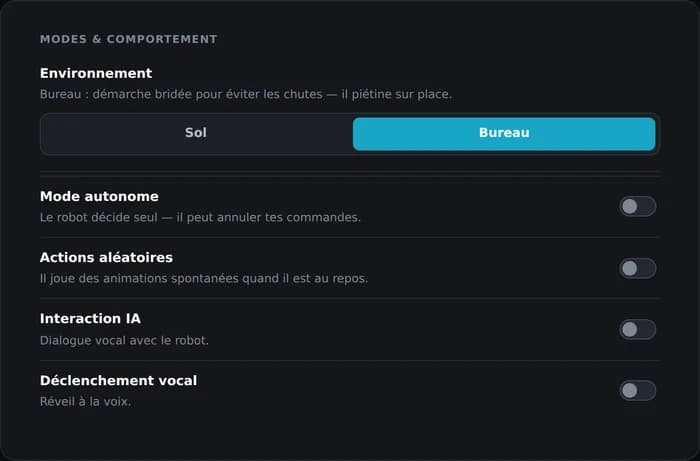
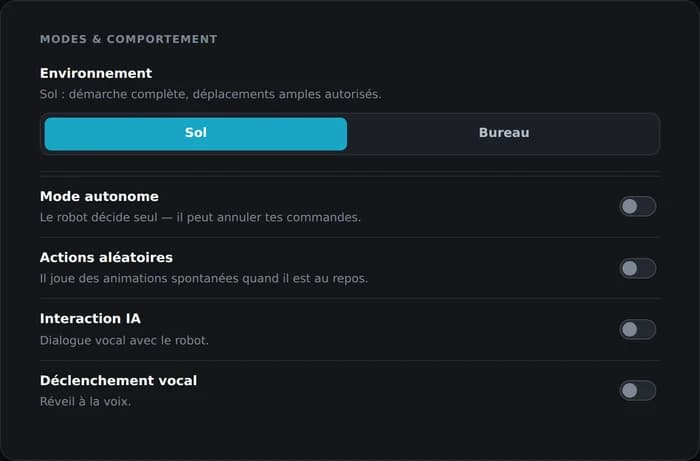
The head screen displays a state called "Ground", and the robot switches into it by itself after a period of inactivity. A vertical swipe on the screen releases that state, but it is not a robot mode change. The vendor release notes are explicit: swiping up unlocks the screen and acts as a wake gesture (versions 2.4.7 and 2.4.9), swiping down puts it on standby. Ground versus desktop mode only changes through USER_SET_ROBOT_MODE, or from an interface.
The official documentation also describes a Developer mode on the head screen, which "suspends the interface to allow Python programming through the APIs". We have not tested it. Navigating that screen is done with the ear buttons, confirmation by tapping the skull.
10The sensor is not where you think
For ten sessions, our robot in autonomous wandering mode stopped dead in front of an obstacle 191 mm away. Always 191 mm, with 5 mm of standard deviation. An obstacle that did not exist: it was running away from its own jaw.
The ToF sensor is not in the head, as the position of the robot's "mouth" suggests. It sits under the neck, high on the chest. Mounted that high and that far forward, it sees its own chin at the top of its field, and its own front legs at the bottom.
The measurement that settles it
With the head tilted ±0.30 rad (17°) on its pitch axis, ToF distances varied by only 1 to 2 mm. A sensor mounted in the head would see its floor distances shift by tens of millimetres for such a tilt.
| Head axis | Bottom row shift | Top row shift |
|---|---|---|
| x (pitch, head visibly moves) | 1 mm | 2 mm |
| y (yaw) | 0 mm | 0 mm |
| z | 0 mm | 0 mm |
The consequences are almost all favourable. ToF geometry depends only on body attitude, which the gait generator already regulates: there is no head angle to track in your own maths. And the head can look elsewhere, follow a face, without disturbing navigation. In exchange, the field is fixed relative to the body: you cannot steer the sensor to sweep the sides, you have to turn the whole body.
Self-occlusion by the legs
| Row | At rest | Hand in front | Drop |
|---|---|---|---|
| 12-15 (top) | 866 mm | 168 mm | 79 % |
| 8-11 | 838 mm | 170 mm | 81 % |
| 4-7 | 334 mm | 211 mm | 37 % |
| 0-3 (bottom) | 237 mm | 195 mm | 18 %, occluded |
A hand waved in front of the sensor drops the measured distances by 80 % on the top rows, but by only 18 % on the bottom row: the front legs already fill that part of the field. And while walking they swing, entering and leaving the field with every stride. Hence two design rules: never base a detection on row 0-3 alone, and learn the background while walking, never at a standstill.
Full ToF characterisation
| Property | Measured value |
|---|---|
| Topic | /state_sensor/tof/distance_array |
| Type | state_sensor_tof/msg/ToFDistanceArray |
| Unit | millimetre |
| Range | 11 to 2047 mm, where 2047 means no target |
| Rate | about 38 Hz (384 frames in 10 s) |
| Zones | 16, on a 4 x 4 grid, all live |
The same reading is also published as a 4 x 4 mono16 image on /state_sensor/tof/heatmap. The raw_registers field (11 values, often 65535) is vendor debug output, of no use.
        top    [12] [13] [14] [15]
               [ 8] [ 9] [10] [11]
               [ 4] [ 5] [ 6] [ 7]
        bottom [ 0] [ 1] [ 2] [ 3]
left rightResting signature
robot standing, head neutral, clear field

   ..   765    ..    ..      <- horizon: out of range
  780   786    ..    ..      <- distant floor
  304   295   291   298      <- floor at ~30 cm
198 219 218 201 <- floor at ~20 cm, right in front of the legsThe bottom rows see the floor at increasing distance. That is where the two readings that underpin any autonomous navigation come from, and the next section with them.
The investigation of 1 September 2026: the firmware switches the sensor off
Everything below was verified on the machine, read-only: no motion, no writes.
The route GET /api/v1/sensor/tof answers 200 and serves a completely empty 4 × 4 grid: distance_mm: 0 and valid: false, sixteen times over. We collected 118 frames across four phases — clear field, obstacle at 40 cm, obstacle at 15 cm, hand sweep. Not one valid measurement, ever. On 25 July, the same machine on the same topic returned sixteen live distances, with 19 to 52 mm of spread and valid: true sixteen times.
We walked back up the chain link by link, and every link is innocent: the REST bridge subscribes to the right topic with the right quality of service; the state_sensor_tof_node node is alive and publishing at 245 Hz without a single error in its log; the upstream source /device_modbus/read_buffer_view is full of live data; the serial link runs at 250 frames per second.
The cause is written in plain text inside the low-level driver binary, in two messages we translate from Chinese: "SLP ToF avoidance disabled (mode = OFF + motion gate = 0)", and, should that disabling fail, "avoidance may still be active; when the ToF is obstructed, the low level will move the legs by itself".
Dated to the minute: the disabling line appears seven times in the driver log, all of them after the last healthy boot, and it is entirely absent from the July and 1 August sessions. The switch coincides with the update to 2.5.5. And the update is indeed what brought it: the previous firmware's backup is kept on the robot, and a binary comparison of the two drivers shows the disabling function does not exist in 2.4.8.
11Tilt is not read from the quaternion
The inertial unit publishes the robot's orientation as a quaternion. Extracting roll and pitch from it through an Euler decomposition yields values that look right and are not.
Tilt is read from the accelerometer, which measures gravity and therefore provides an absolute vertical, immune to drift. With one condition: only at rest. In motion, the robot's own acceleration adds to gravity and the reading loses its meaning.
The quaternion keeps its use for anything relative, a change of orientation between two nearby instants. What it cannot provide is an absolute tilt that holds over time.
12What the ToF enables: cliff detection
This is the single most useful finding of the whole effort, and it needs no extra hardware. Since the bottom ToF rows permanently see the floor at 20 and 30 cm, all you have to do is watch for it disappearing.
- Obstacle: the top rows stop saturating and the bottom rows shorten.
- Cliff (table edge, step, stairs): the bottom rows, which were seeing the floor, jump abruptly to 2047, meaning "no target".
The implementation principle we settled on: the node learns its background over five seconds of walking in a straight line, as a per-zone minimum and maximum envelope. From then on it only reacts to deviations. What shortens is an obstacle, what lengthens is a void.
The guardrails that turned out to be necessary
- A cliff overrides every other decision.
- Only the bottom rows may declare a cliff, and only the zones that were seeing the floor at close range (under 50 cm) and nearly always (80 % of frames).
- Any decision must persist for three cycles before being acted on: the trot makes the body pitch, and a single frame proves nothing.
- Reversing is capped at half the forward speed and limited to 1.5 s, because the robot sees nothing behind it.
- A dead-end rotation lasting more than 5 s triggers a reverse and a change of direction, otherwise the robot spins forever.
- The node publishes ten zero commands on shutdown, including on SIGHUP. Validated for real during a Wi-Fi outage: the robot stops cleanly instead of coasting on its last command.
The version history says it all: endless reversing in v1 (only 8 zones learned, the rest screaming that something had appeared), phantom cliffs in v6 (saturated far zones taken for precipices), endless spinning in v7, and v8 which exposed the normalised speed trap. v9 slips through and dodges. v10 held 11 s of straight walking and survived an SSH drop.
v12 masks a narrow 170 to 225 mm band at the top of the field, the jaw signature, but only when the bottom rows do not corroborate, so a low shelf stays visible. It also replaces the fixed 120 mm margin with a margin proportional to the learned background (30 %, floored at 50 mm): with a 200 mm background, a fixed 120 mm margin made the bottom rows unable to trigger anything at all. Thirty-four offline tests replay real frames captured on the robot.
v13, the one shipped with the tool, replaces the single reaction with a graded response. Beyond 300 mm the robot dodges while still moving forward, steering towards the less cluttered side: it compares the cumulated clutter left and right, and re-evaluates on every cycle. Below 300 mm it turns on the spot. It only reverses below 200 mm, or when stuck, because reversing is blind: nothing looks behind it. That is the whole reason for the gradation. It also exposes an HTTP service on port 8790 publishing the grid, the decision and its reason, and accepting start, stop and speed: this is what the Roaming tab displays and drives, through a pass-through on the bridge.
Two iterations later, v15 fixes a flaw that became obvious once you watched the robot for a while: faced with a symmetrical obstacle, it always went the same way. That left-hand bias is gone. The reversing triggered by a cliff detection is now bounded as well, instead of running until something else interrupts it.
What our tool did about it, now that the sensor is off
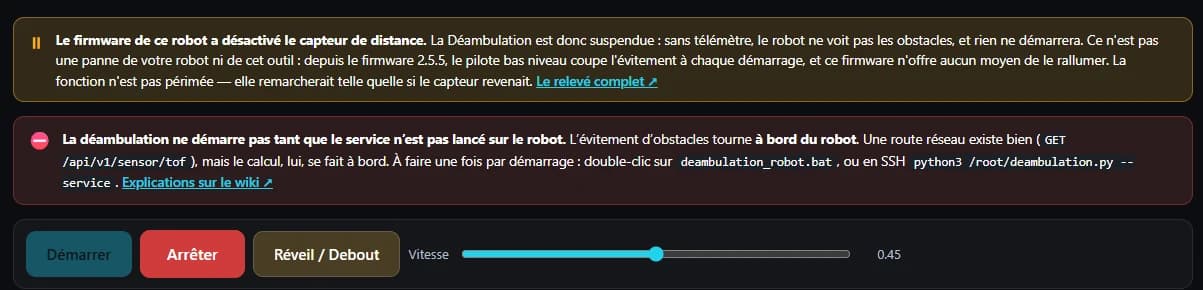
The Roaming tab was neither removed nor emptied. It queries the robot on load: if the rangefinder's sixteen channels come back invalid, it shows a dated banner explaining why, and disables the "Start" button. The walking code itself is untouched. It would work again as-is.
The right word is "suspended", not "removed". That is an editorial choice as much as a technical one: we do not rewrite the history of a function that worked, and we do not make measurements disappear because a firmware changed its mind.
13Safety
- The robot sees nothing behind it. The ToF looks forward and there is no rear sensor. Any reverse motion is blind: low speed, bounded duration.
- The motors get hot. Avoid very long continuous sessions, all the more since temperature reporting is mute on this firmware.
- Do not modify firmware files without a backup. Work with your own scripts in
/root/or a folder of your own. - Keep an emergency stop at hand, in an already open terminal. Publishing zero commands in a loop is the most reliable way to stop everything.
- The UDP
Play_Keyframeroute bypasses the robot's protections. Only use it once you have read the joint limits, and never for a first test.
Watching motor load
The motor-load event reports 14 loads at 1 Hz, in PWM per mille, over a ±1000 range. It is the only reliable instrument available to detect a stall, since the temperature probes are silent. Real measurements:
| Condition | Observed peak |
|---|---|
| At rest | 120 to 162 per mille |
| Walking at 0.06 m/s | 540 per mille |
| Walking at top speed | 530 per mille |
| Rotating at top speed | 540 per mille |
| Stalled motor | 950 to 985 per mille, sustained |
The firmware also applies its own guards, permanently active: joint angle clamping, workspace clamping, a 0.5 rad joint jump threshold, and motor speed capped at 200 rpm. An out of range command is clamped rather than driven into the stop. That excuses nothing, but it is a net.
Finally, the official documentation mentions an Emergency_Stop mode through Mode_Switch, which we have not tested yet and had rebuilt by hand. If you validate it, write to us.
14Making the robot walk
Two routes, depending on whether you work from your machine (WebSocket) or from the robot itself (ROS 2). Either way, reread normalised speed and ground versus desktop mode first: they account for most cases where the robot refuses to move.
Over the WebSocket
| Command | Payload | Effect |
|---|---|---|
gait_control | {linear_x, linear_y, angular_z} in [-1, 1] | continuous walking |
gait_step_move | {linear_x, linear_y, angular_z, steps} | walks a given number of strides, counted by the robot itself |
set_motion_mode | {mode, mode_name} | DEFAULT, SLOW, WALK, PRECISION, CLIMB, FAST_RUN profiles |
self_recover | {} | stand up after a fall |
Over ROS 2, from the robot
import rclpy
from rclpy.node import Node
from geometry_msgs.msg import Twist

# WARNING: linear.x is NORMALISED in [-1, 1], not m/s.
# 0.10 marches in place. 0.45 actually walks.

rclpy.init()
node = Node('hello_move')
pub = node.create_publisher(Twist, '/gait_generation_trot/cmd_vel', 10)

cmd = Twist()
cmd.linear.x = 0.45
for _ in range(30):
    pub.publish(cmd)
    rclpy.spin_once(node, timeout_sec=0.1)

# always republish zeros when stopping
cmd.linear.x = 0.0
for _ in range(10):
    pub.publish(cmd)
rclpy.spin_once(node, timeout_sec=0.05)The /gait_generation_trot/step_move service (type gait_generation_trot/srv/GaitStepMove, fields velocity and duration) takes a clean step and returns. It is the simplest first test: a negative velocity walks backward.
Standing up, lying down
ACTION_PLAY {
  "file_path":"/root/material/actions/stand_default_returnPosition_brief.avi",
  "loop":false,
  "priority":5,
  "torque":2047
}Three details matter, and each one cost time: the action is returnPosition, not stand_default_idle; priority 5 is mandatory, because at priority 1 (the default) the running autonomous behaviour overrides the action and the robot stays down; and torque must be at maximum.
Sleep
After inactivity the robot enters the sleeping emotion state, with arousal near zero, and crouches. In that state, walking commands produce nothing useful. To wake it remotely, play the stand-up action from the previous subsection, at priority 5. Verified on the robot: it stands back up and obeys again.
What cannot be driven remotely is the emotion state itself: EMOTION_SET_STATE answers service_unavailable on this firmware, and EMOTION_INTERACTION rejects every type we tried (touch_tap, touch, pet, dog_bone). The distinction matters: you cannot change its mood, you can absolutely put it back to work.
15The action format, and what it says about postures
The robot's animations live in .avi files, a container repurposed from video. Each file carries the body trajectory, the foot trajectories, and often an audio track.
"Constant contacts" means rigid legs under the body, and a jump passes that filter without difficulty. The safety of a posture comes from the bounds placed on the body, not on the feet. A check that watches the feet lets a jump through, reading it as a stationary stance.
What the library contains
- The container has three shapes, not one: 56 files with four streams, 43 with three, 4 with two. A reader assuming a single shape fails on a third of the library.
- 63 actions out of 103 carry sound, as RTP G.711 A-law.
- That audio track runs at 16 kHz inside a payload type that announces 8. The discrepancy follows from the timestamps, with no need to listen.
The full format, its rewriting and the on-machine playback are documented in the project repository, together with the records that support them.
16Gestures, vision and camera
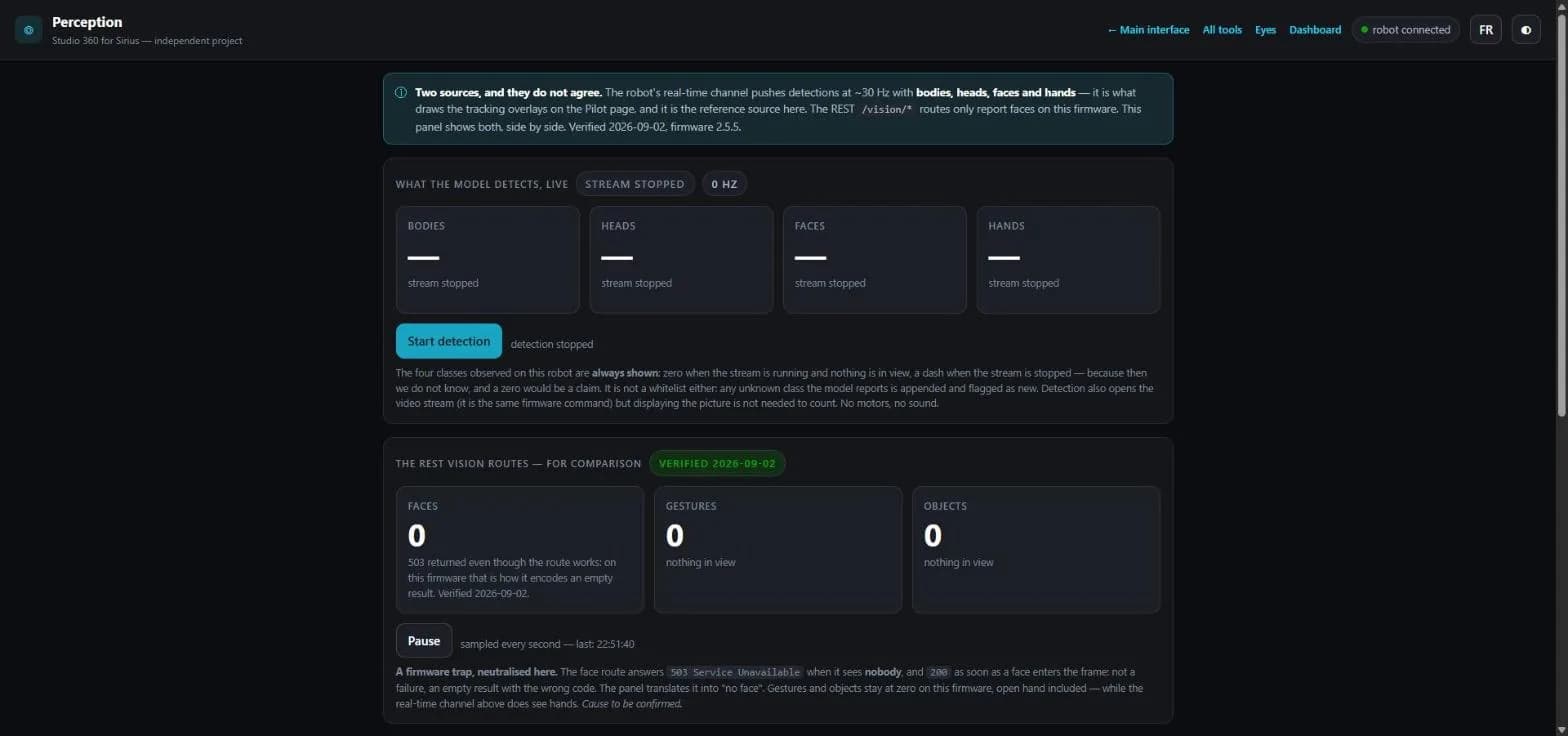
Hand detection: yes. Gesture recognition: no.
And the robot can track a hand, with its own kinematics
Detecting is not tracking. Yet the face_tracker node, which we assumed was face-only, actually handles two targets: it switches between them through an internal follow_face or follow_hand command on the /face_tracker/control topic. The mode sticks: one message is enough, the robot keeps the setting.
The motion is then computed on board, by the robot's own kinematics. It is smooth and latency-free, which no PC-driven tracking can match: the loop never crosses the network.
For the record, here is what the vendor had planned on the gesture side. A recognition model exists on the D-Robotics side, and the sirius_full_v2.3.6 package references the topic /hobot_hand_gesture_detection (ai_msgs/PerceptionTargets), with a gesture attribute carrying an integer value.
| Value | Gesture | Value | Gesture |
|---|---|---|---|
| 2 | ThumbUp | 11 | Okay |
| 3 | Victory | 12 | Thumb Left |
| 4 | Mute | 13 | Thumb Right |
| 5 | Palm (open hand) | 14 | Awesome |
The vision-detection event
Once VISION_SET_DETECTION is active, the robot pushes an event on the main channel at around 30 Hz. This is the perception model output, available without touching the video stream: you can track without ever displaying an image.
{"type":"event","event":"vision-detection","data":{
  "detections":[
    {"class_id":0,"class_name":"body","type":"body","confidence":1,
     "rect":{"x":239,"y":1,"width":126,"height":192}},
    {"class_name":"head","rect":{}},
    {"class_name":"face","rect":{}}
  ],
  "skeletons":[
    {"track_id":1,"type":"body",
     "points":[{"x":191,"y":3,"score":0.859}]}
  ],
"image_width":640,"image_height":360}}- Coordinates are in the model's 640 x 360 frame, not that of the displayed video. Rescale them, and account for letterboxing if the video uses
object-fit: contain. track_idpersists across frames: this is tracking, not per-frame detection.- Classes observed:
body(0),head(1),face(2) and, since 2.5.5,hand(3). Plus the skeleton, up to 19 points. The "bone, ball, plush toy" objects in the firmware are virtual items of the emotion system, not vision classes. - Mind the numbering: REST
/vision/facesnumbers the faceclass_id5, while the WebSocket numbers it 2. The two sources do not count alike. - At 30 Hz, never route these frames through React state: keep them in a ref and draw inside a
requestAnimationFrame.

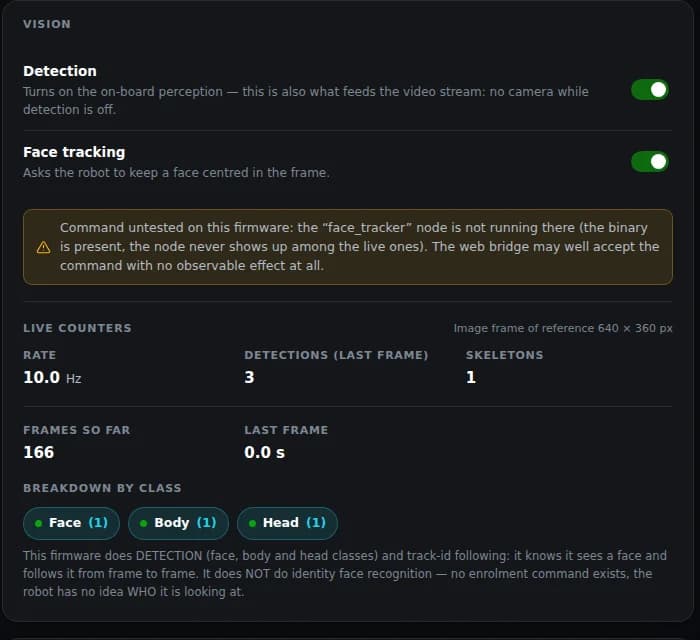
face_tracker node does run, and it follows both targets.The camera, over WebRTC
This is not an image to fetch: it is a WebRTC stream negotiated over a second WebSocket. The video then flows directly between browser and robot, peer to peer. A backend can only relay signalling, never serve the stream.
- On
:8765, sendVISION_SET_DETECTION {enabled: true}. The robot answers "Web streaming enabled". - The browser opens
ws://<IP>:8766, with no URL parameter. Video signalling does not live on the main channel: looking for it there leads nowhere. - The robot sends
{"type":"welcome","client_id":"ws_N"}there. That identifier is a string, distinct from the numericclient_idof the handshake. Reconstructingws_<number>does not work. - The browser sends
webrtc_offerwith thatclient_id, the robot replieswebrtc_answer. - Exchange
webrtc_ice. The robot's candidates arrive prefixed witha=, which must be stripped beforeaddIceCandidate.
If peer to peer is blocked by the network, a simpler fallback remains: the ROS service /camera/capture_jpeg, displaying successive stills. Camera services on the ROS side: /camera/capture_jpeg, /camera_publisher_node/enable_web_streaming, /camera_publisher_node/enable_yolo_shm.
17Controlling the head
The channel confirmed on the robot is a ROS input topic of the inverse kinematics node. It receives a command and publishes nothing back.
topic : /kinematics/ik_subscriber/head_euler_follow
type  : geometry_msgs/msg/Point
unit  : RADIANS

x = pitch (up / down)
y = yaw (left / right)
z = no observable effectxdrives pitch, confirmed visually.ydrives yaw.zhas no observable effect: the head has only two degrees of freedom.- From 0.10 to 0.35 rad the motion is progressive. Stay under 0.35 rad: beyond roughly 1 rad you hit the joint stop.
Useful reminder: since the ToF sits in the chest and not the head, moving the head does not disturb navigation. You can have the head track a face while the body navigates on the same, unaffected ToF field.
18Volume, LEDs, screen, and what the eyes will accept
Three settings the vendor documentation never mentions, and one frequently asked question settled in the negative, with its proof. Everything below was recorded on the machine in late July 2026, firmware 2.5.0.
Volume: a ROS parameter, not a dedicated command
Sound volume is the ROS parameter audio_volume, an integer from 0 to 100, held by the wmix_audio_player_node node. You set it with the WebSocket command USER_SET_NODE_PARAMETER, carrying node_name, parameter_name and parameter_value. The frame was captured on the vendor's own official interface, by listening to WebSocket 8765 while moving the volume slider.
{ "command": "USER_SET_NODE_PARAMETER",
  "node_name": "wmix_audio_player_node",
  "parameter_name": "audio_volume",
"parameter_value": 54 }Two caveats. Reading the volume is not supported: the symmetrical GET is most likely USER_GET_NODE_PARAMETER, but we never captured it, so our tool shows a question mark instead of the current level. And on the official interface, changing the volume triggers an audio preview: the robot plays stand_default_littleBark_brief, stands up and barks briefly. That is not a malfunction.
The LEDs: over UDP only
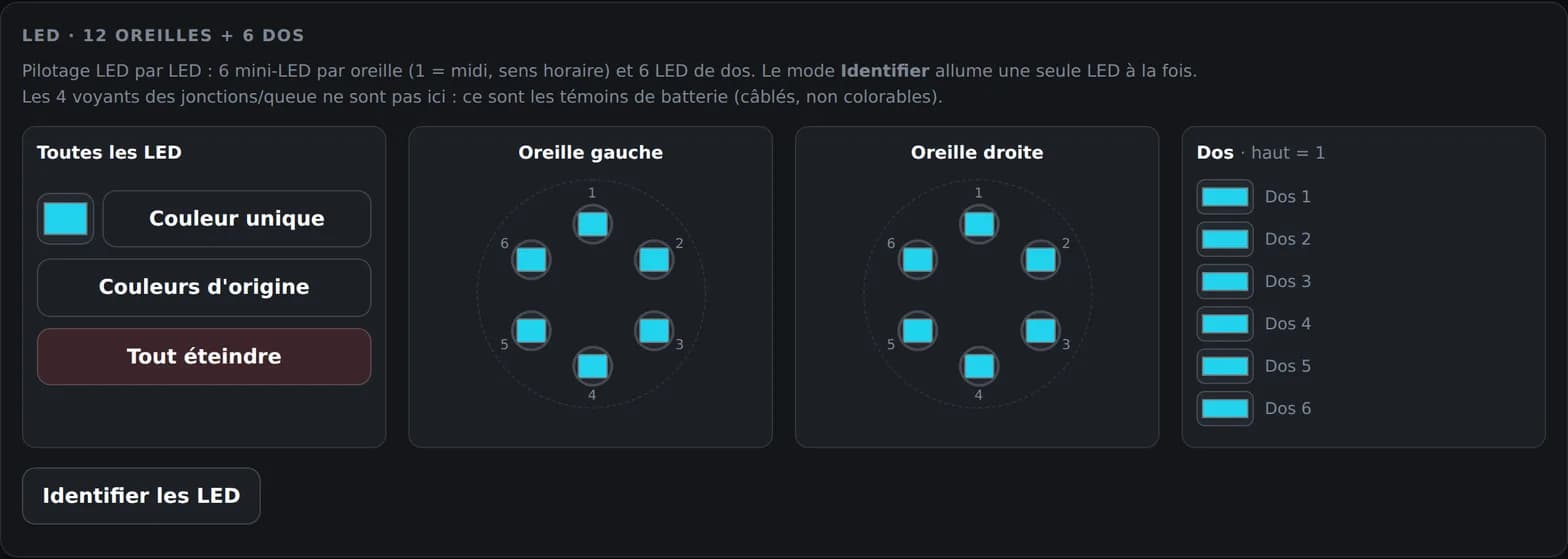
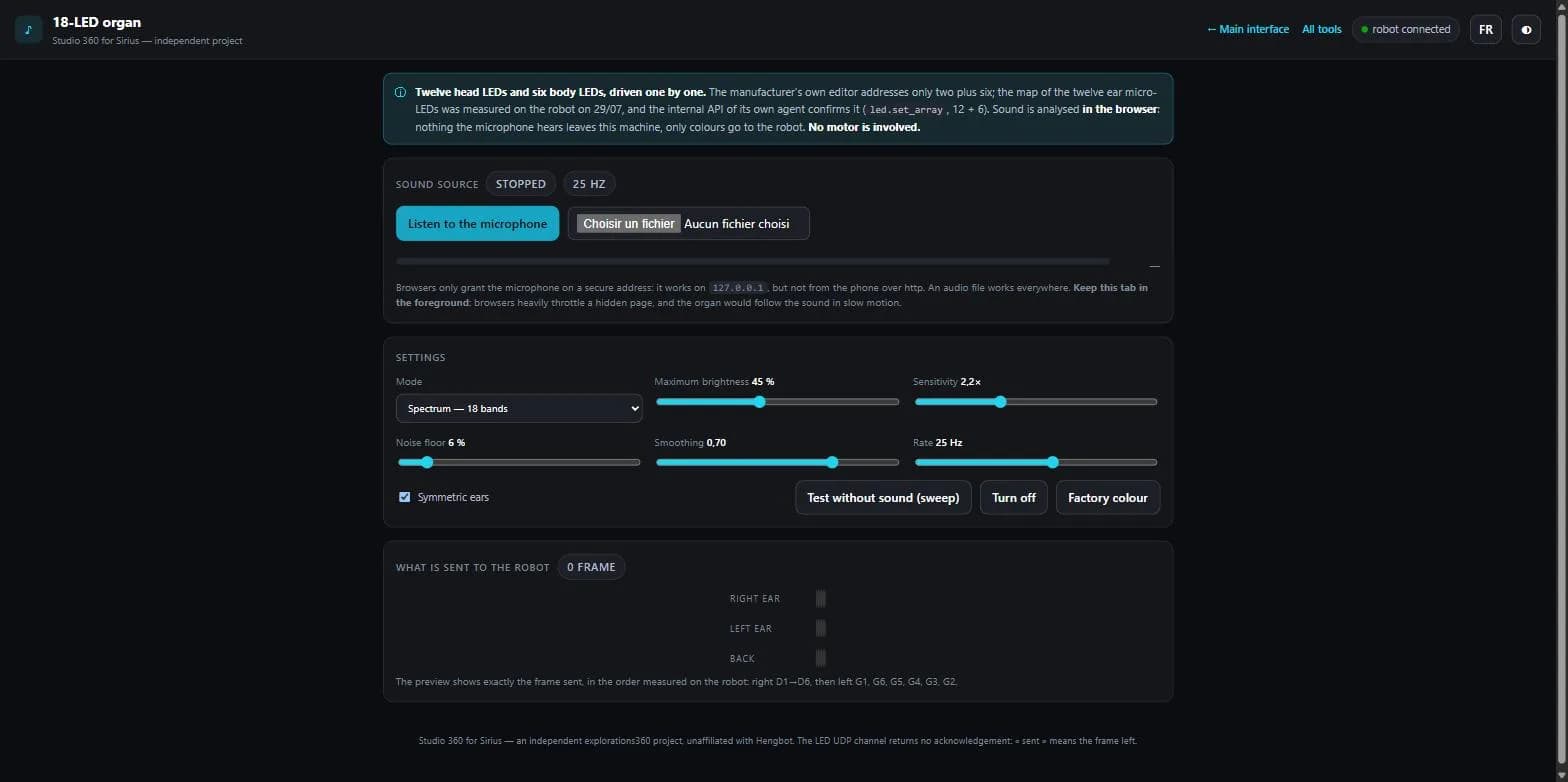
The robot carries eight colourable light points, two on the head and six on the back. They are reachable only through the UDP channel on port 8768, which republishes to the topic /robot_led_controller/led_colors. No other known route: not WebSocket, not REST.
That count needs a refinement, obtained by pushing the control further: each of the two head points is in fact an ear made of six mini-LEDs arranged in a circle, addressable one by one, exactly like the six LEDs on the back. That makes twelve channels on the head and six on the back, eighteen in total rather than eight. Numbering starts at the top, 1 at twelve o'clock, then clockwise.
That UDP channel is worth a closer look, because it also gives direct access to walking, body attitude, the head and all four legs without going through the WebSocket. It is the route the vendor's Blender script uses to preview an animation live.
| Topic republished by the UDP 8768 server | What it drives |
|---|---|
/gait_generation_trot/cmd_vel | Walking |
/kinematics/ik_subscriber/body_pose | Body attitude |
/kinematics/ik_subscriber/head_quaternion | The head |
/kinematics/ik_subscriber/…_point | The four legs, one topic each |
/robot_led_controller/led_colors | The LEDs, the only known access |
/lvgl_layer | Screen and eyes, but nobody is listening (see below) |
/udp_server/status | The server's own state |
The head screen: through ROS services
The screen is driven by ROS services live on the machine: /lvgl_gui_node/play_lottie and /play_gif for animations, /lvgl_gui/show_toast and /show_dialog for messages, /show_ip_address, and /camera_display/toggle. That is what our tool uses to display text or replay an animation from the robot's own library.
You can change the eyes' expression, you cannot puppeteer them
This is the most frequently asked question, and on that precise point the answer is no. The UDP server does understand the keys eye_iris, eye_upper and eye_lower perfectly well: they sit in its binary, and it dutifully republishes them on the /lvgl_layer topic. Except nobody listens any more.
ros2 topic info /lvgl_layer
# Publisher count: 2
# Subscription count: 0Zero subscribers: lvgl_gui_node, which draws the screen, is not among them. The hide_eye_layer parameters on the screen services confirm that the eye layer is handled inside that node. And the vendor's Blender add-on shows where the eyes really live: their data is embedded in the action files themselves. The screen is animated by the action player and the emotion engine, not by a command from outside.
The result now rests on three independent channels and two firmwares: UDP 8768 with no subscriber, the POST /performance/ui route returning 404 from the network and locally on the machine alike, and the Python SDK missing from the robot. Re-checked after the move to 2.5.5: nothing changed.
The other door: playing a GIF or a Lottie on the face
The firmware migrated its expressions to GIF — the 2.4.8 release notes say so: "Fully migrated to GIF emoji expressions". The layer rig is no longer consumed: the UI track of the action files still exists, the network route that plays it answers success: true… and nothing happens. No screen node logs anything at all. It is dead code that acknowledges and discards.
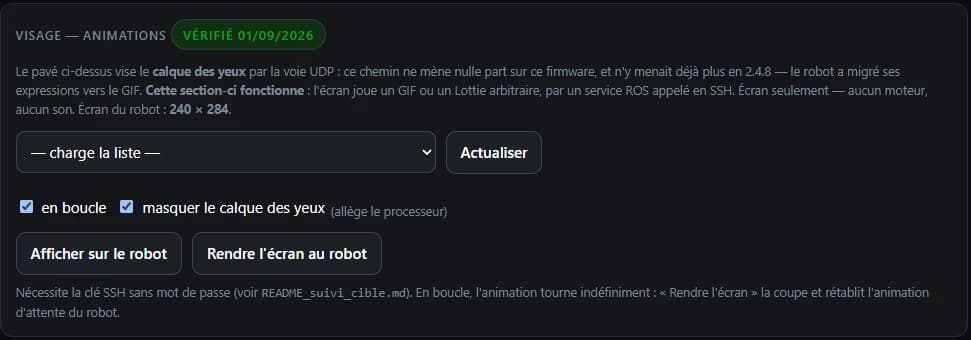
But the screen exposes two ROS services, play_gif and play_lottie, not publicly documented, which accept an arbitrary absolute path. And the vendor planned for it explicitly: the signature's own comment reads "to play a temporary file such as /tmp/*.gif". This is not a workaround.
- Parameters: position (−1 = centred), size (0 = original size), infinite loop, background colour and opacity for Lottie, and a
hide_eye_layerthat masks the leftover layer and eases the CPU. - Screen: 240 × 284 pixels. The idle animation is looped again as soon as no animation holds the foreground.
The trial, successful on 1 September 2026: a 240 × 284 GIF at 50 ms per frame, built on the PC, dropped into the robot's /tmp, played on a loop. The animation shows on the face. No motor involved, no sound.

/tmp, looped by the ROS service.Our tool turns this into a new "Face — animations" section in the Eyes tab: list of the animations present on the robot, loop, layer masking, play and stop. None of that exists in the official application.
One lead stays open, on the mood side this time: the ROS services /emotion_manager/set_emotion_state, /adjust_emotion and /adjust_satiety do exist on the machine. The ROS route might make the emotional state commandable where the WebSocket answers service_unavailable. We have not tested it yet.
19The robot has no sleep mode
Powered on, a Sirius runs warm permanently. The firmware offers several lying postures, but none of them is a rest state: send lie_default_idle, the most natural one, and all fourteen motors keep working. Loads range from 10 to 172 ‰ across channels, peaking at 307 ‰.
In that posture the robot holds both front legs in the air: this is not a resting position, it is an actively held pose. The weight bears on the rear shoulders, which feel hot to the touch while the front stays lukewarm. A posture named "lying down" tells you nothing about what it costs.
The lever, and what the kit does with it
The /device_modbus/set_motor_torque service cuts torque on all fourteen motors. The Rest card in the Robot life tab uses it: it lays the robot down, then cuts torque. Commanded load drops from 307 ‰ to 5 ‰.
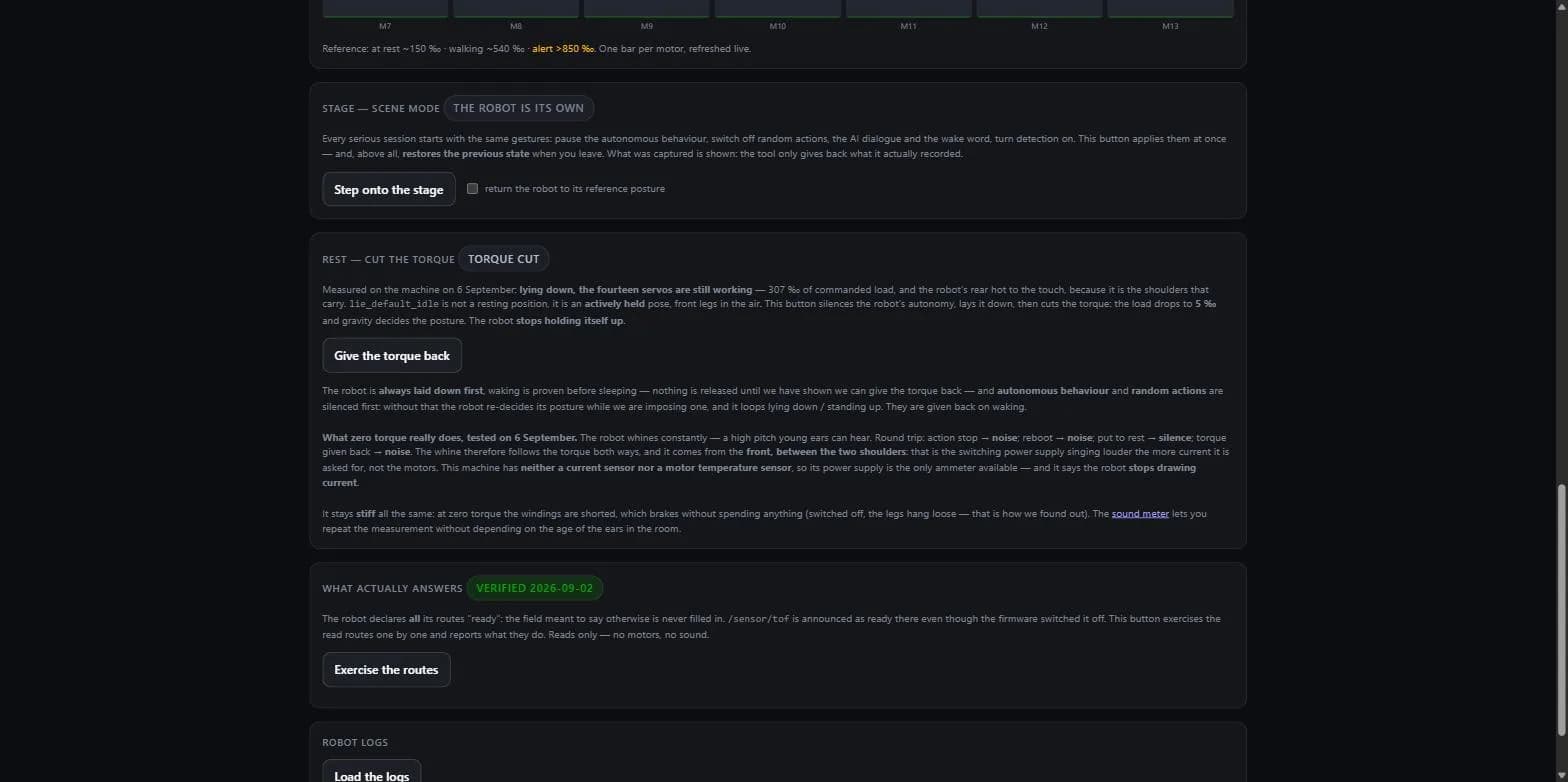
- Prove the wake-up before the sleep. Check that the robot gets back up before putting it to rest for the first time.
- Lay the robot down first. Cutting torque on a standing robot makes it collapse.
- Turn autonomy off first. Otherwise every idle animation restores full torque, and the rest sequence loops between lying and standing.
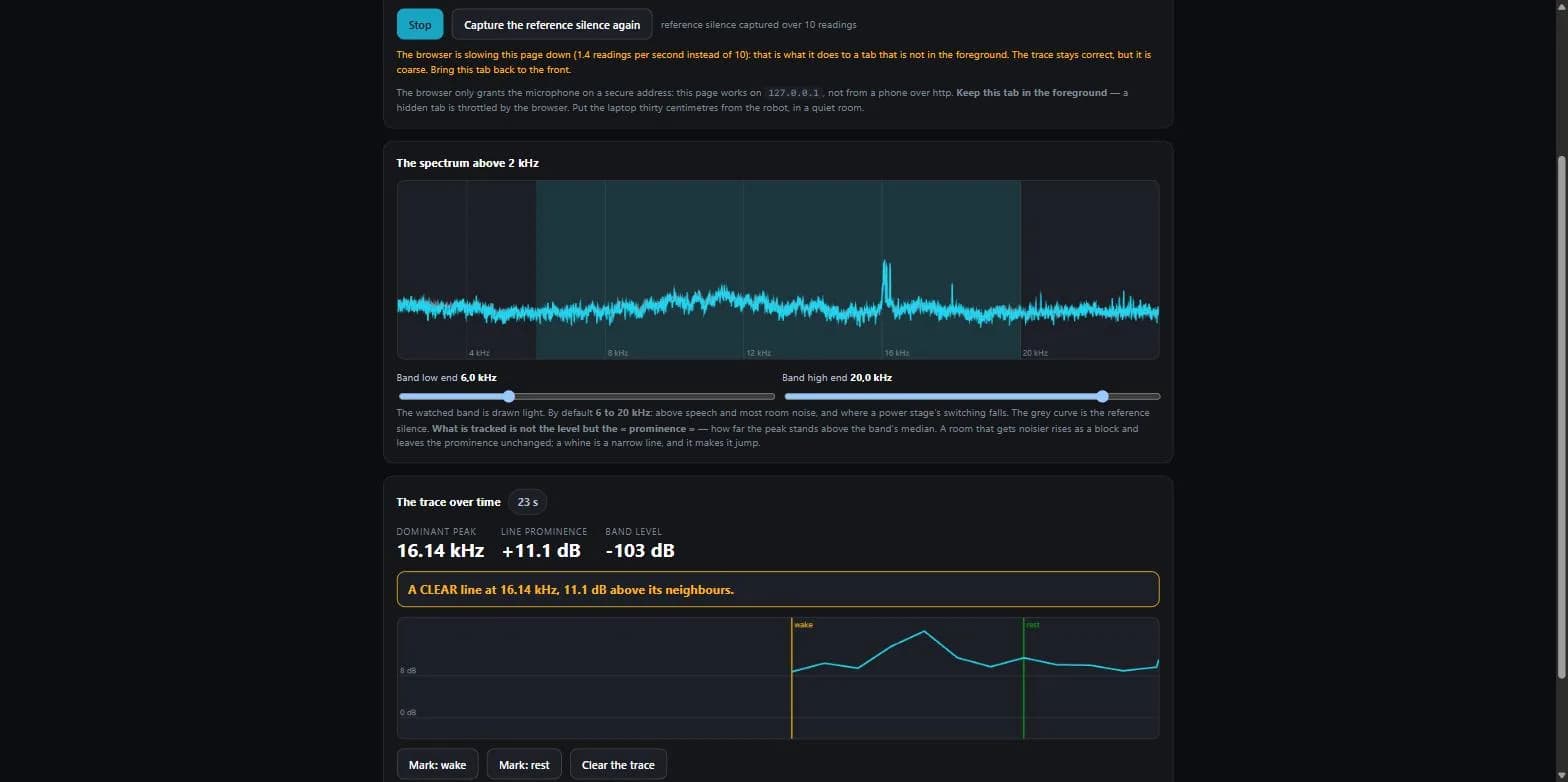
The full investigation, negative results included, is published as The Hengbot Sirius has no sleep mode, and it cannot tell you what it draws, available in the project repository.
20What does not exist, and what the docs omit
This section exists to stop you spending hours looking for something that is not in the machine.
What does not exist
- No head angle feedback: the topics exist but stay silent.
- No motor temperature: the
motor-temperatureevent returns 0 on this firmware, the probes are mute. - No remote control of the emotion state:
EMOTION_SET_STATEanswersservice_unavailable. Waking the robot, on the other hand, works fine through the stand-up action. - No native clap detection, and no pointing finger in the gesture model.
- No vision classes beyond body, head and face so far. The
enable_yolo_shmservice suggests a YOLO model exists elsewhere, unconfirmed.
What does exist, and the documentation ignores too
The previous list has a positive counterpart: the IMU is readable, even though the spec sheet mentions it no more than any other sensor.
/state_sensor/imu_onbody/imu_publisher/imu_data    sensor_msgs/msg/Imu
/state_sensor/imu_onbody/imu_publisher/imu_angle   geometry_msgs/msg/Vector3
/state_sensor/imu_onbody/imu_publisher/diagnostic "IMU sensor is operating normally"imu_angle acts as a guardrail in our wandering node: if body attitude drifts more than 0.10 rad from the learned one, the ToF geometry is no longer valid and every cliff decision is suspended. A concrete case of one undocumented sensor being used to make another undocumented sensor safe.
What the official documentation omits
| Topic | Documented by the vendor? |
|---|---|
| Any sensor readout at all | No |
| The ToF sensor, including in the specifications | No |
| The IMU, the camera | No |
| ROS 2, although an EDU version is sold on that argument | No |
| Ground / desktop mode, action priority, sleep | No |
| The emotion system, the action library, AI interaction | No |
| The REST API on port 8088, SSH access | No |
| The "Sirius Core API v4.0.0" protocol and its 59 commands | No, it appears nowhere |
The "keyframes" WebSocket API and the hengbot Python API | Yes |
The Emergency_Stop and Free_Mode modes | Yes, and we did not know about them |
The official documentation does exist and is worth reading: it describes a different WebSocket API from the one we mapped, the "keyframes" route of UDP port 8768, with commands such as Mode_Switch, Control_Move, Start_Record, Play_Keyframe, Get_Status, Set_Parameter. It also documents a Freedom mode and a Developer mode on the head screen, plus a hardware self-test (IMU, buttons, battery, Wi-Fi, servos).
The independent ecosystem, as of July 2026
The ground is nearly untouched. Eight months after the first deliveries, the number of developer tutorials published on YouTube, in any language, is zero. Everything that exists fits into two repositories, from a single person:
- dspeers/sirius-control-panel: finds the REST API on
:8088and an MJPEG stream on:8080. Itstest_api.pyis the only publicly available reconstructed API documentation, and the only public source mentioning the 4 x 4 grid. - dspeers/sirius-voice-bridge: swaps the stock speech recognition for a local one. It incidentally reveals that Sirius voice traffic goes through the ByteDance / Volcano Engine cloud, something no press coverage mentions.
mitchrk/sirius-osrdadvertises an open source firmware and is completely empty.- The
hengbot-apiPyPI package is a false friend: it dates from November 2024 and drives the Sparky, the previous robot.
21Updating when the official update fails
On our machine, moving from one beta to the next failed consistently at around 70 %. The update node's log gives the reason in one line: Download failed: Timeout was reached.
The robot's update node gives up after 600 seconds. The vendor's package server was delivering roughly 140 KB/s to the robot: at that rate, a 120 MB package cannot finish within the deadline. Neither the beta channel password nor the procedure is at fault. The channel opens, the download starts, it simply runs out of time. Three attempts, three failures at the same point.
The workaround: download on the PC, apply over SSH
A computer has no such time cap. On ours, the same package came down in three and a half minutes, roughly four times faster than on the robot. The method has three steps.
- Download the package on the PC, from the vendor's official server, with resume enabled to survive a dropped connection. It is the same file, at the same address, that the robot fetches by itself: nothing is built or modified.
- Check the archive before applying it. A simple archive read test rules out a truncated download, and the size must match the one announced in the changelog. This is the step not to skip.
- Apply it over SSH with a manual deployment tool, which uploads the archive locally, extracts it, reads its manifest, stops the services, lays down the files, writes the new version, runs the post-install script and reboots.
The rest of the procedure depends on no particular tool: a download, an archive check, a file drop over SSH.
22Driving the robot from a browser
Studio 360 for Sirius, or Studio 360 for short, is the tool we used throughout this work, and it is available for download. It is not a product: it is a reverse-engineering tool that became usable, published because it saves hours to anyone getting started.
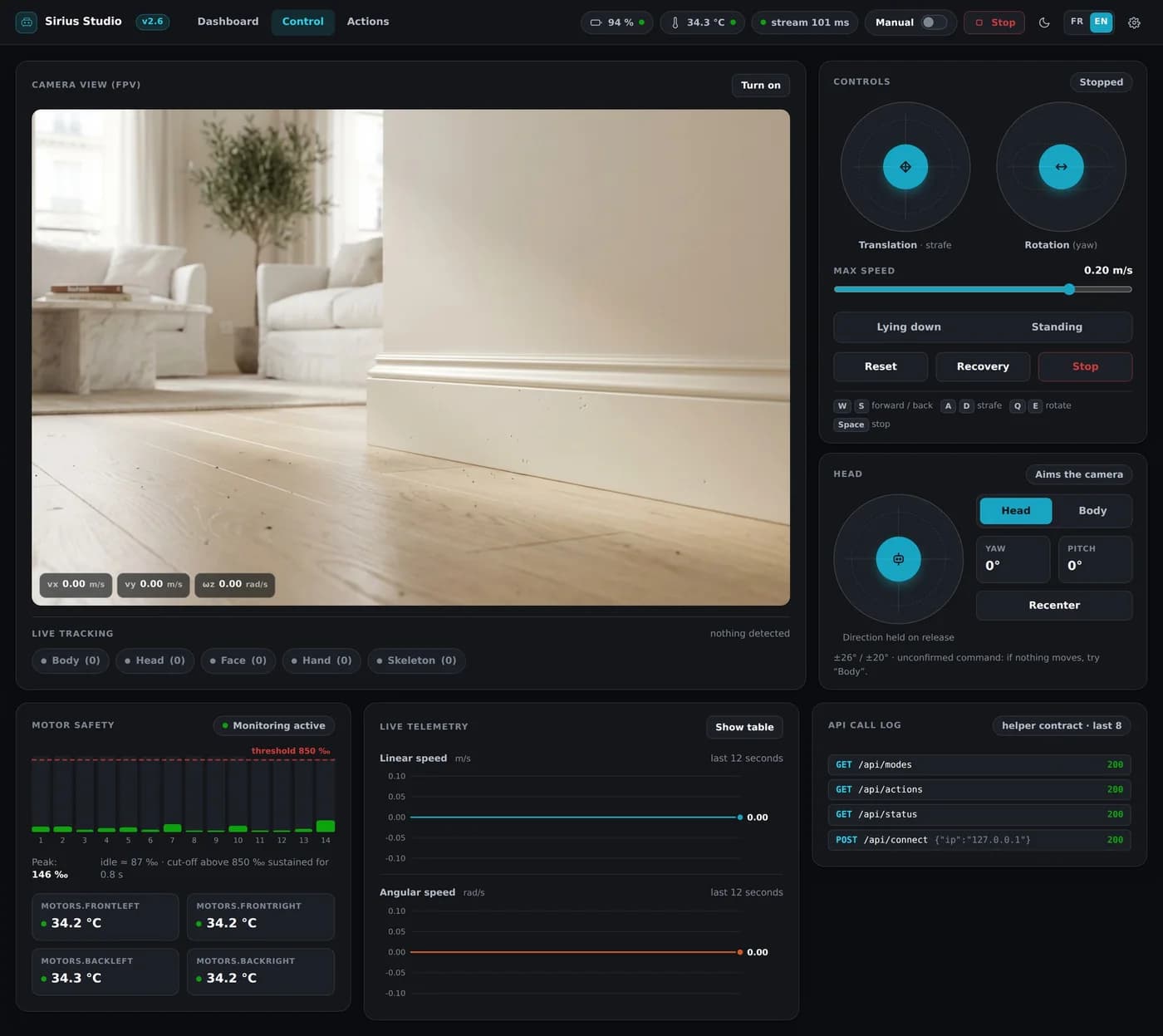
What it does: two joysticks to walk and turn, a third for the head, the live camera view with detections drawn on top, the robot's action library with names translated from Chinese, telemetry for all 14 motors, a log of every API call, the Ground / Desktop switch, and a cut-off that stops the robot beyond 850 per mille of motor load sustained for 0.8 s.
How it is built: a Python bridge runs on your machine (FastAPI), speaks WebSocket to the robot and serves a React interface to your browser. The video goes straight from robot to browser over WebRTC: a backend can only relay signalling, never the stream.
The interface is bilingual French and English: an FR / EN button in the top bar, next to the theme switch, and the choice is remembered. The posture button is called Lying down rather than "on the ground", so it cannot be confused with Ground / Desktop mode, which describes the robot's environment and not its posture. That selector reflects the robot's actual state, including when autonomous behaviour acts on its own: the posture is inferred from the action being played, flagged as such, and nothing lights up until it is known.
The seven tabs
The interface fits into seven tabs: Dashboard, System, Robot life, Actions, Sequences, Control and Roaming.
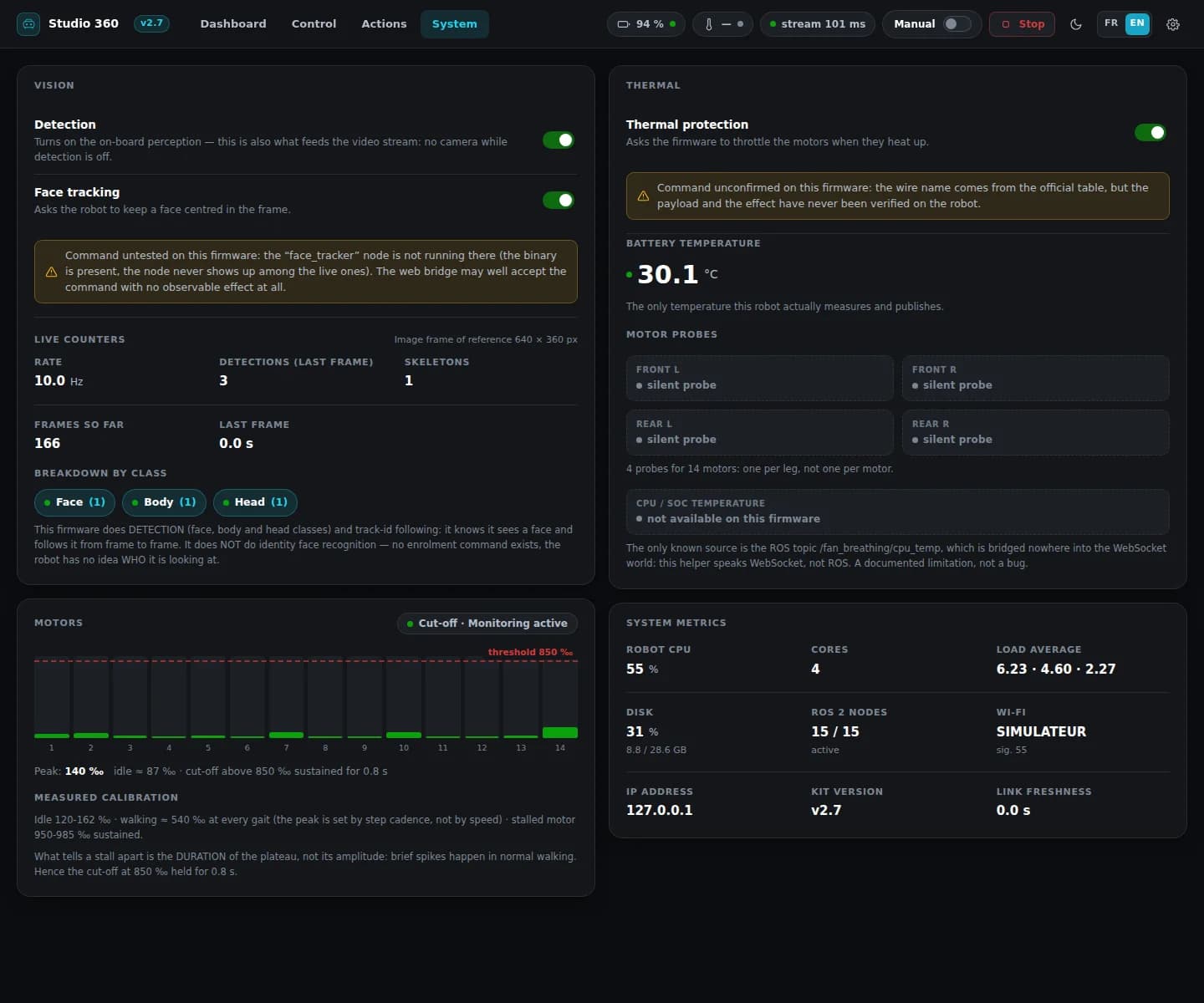
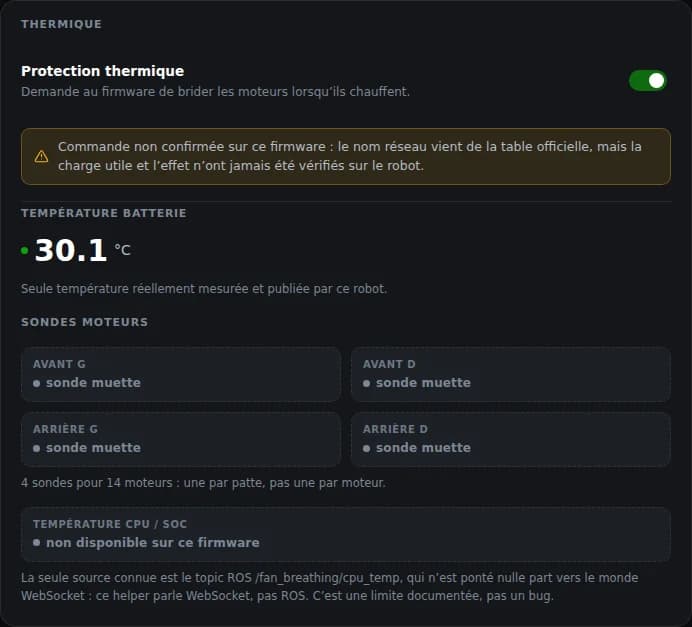
The System tab is a diagnostics view: live vision counters, the load of all 14 motors and the state of the cut-off, machine metrics (CPU, disk, live ROS nodes, network, link freshness), and a thermal panel that tells the truth rather than making things up. Battery temperature is displayed, because it is the only one the robot actually publishes. The four leg probes are declared silent, since they return 0 on this firmware. And CPU temperature has been displayed since v2.8.6. We used to state here that it existed neither on WebSocket nor on REST: that was wrong. The robot does publish it, in the temperature field of the system_metrics WebSocket event; we were looking at the motor probes and at the ROS topic /fan_breathing/cpu_temp. As a corollary, the temperature chip in the vendor console also shows the CPU, not the battery.
The "autonomous" switch in the top bar goes through the POST /api/modes/autonomous route, which sends BEHAVIOR_SET_PAUSE to the robot.
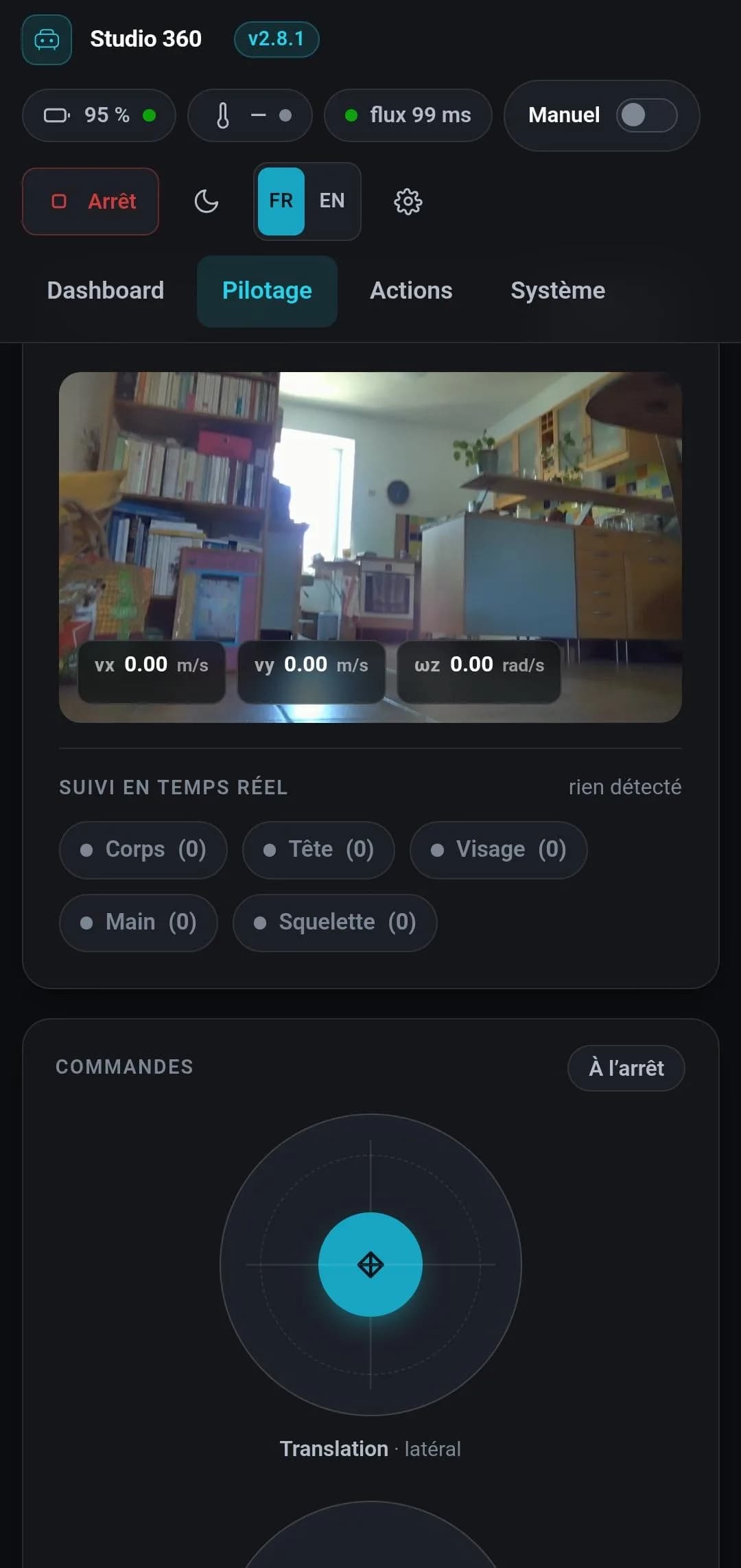
The interface installs on a phone like an app, with its manifest, its icons and iOS full screen: driving the robot while following it around the room is possible. The bridge itself stays on your machine; the phone is just one more screen opened onto it. That is the job of network mode, launcher demarrer_telephone.bat: the bridge listens on the local network and the console window prints the address to type on the phone.
The theme is applied before the first render, so there is no light flash on load, and the top bar button cycles dark, light, then system, the last one following the machine's day / night switch live. One deliberate difference from the vendor's official client: it disables zoom, we do not. Buying a tidier look by killing pinch-to-zoom costs accessibility.
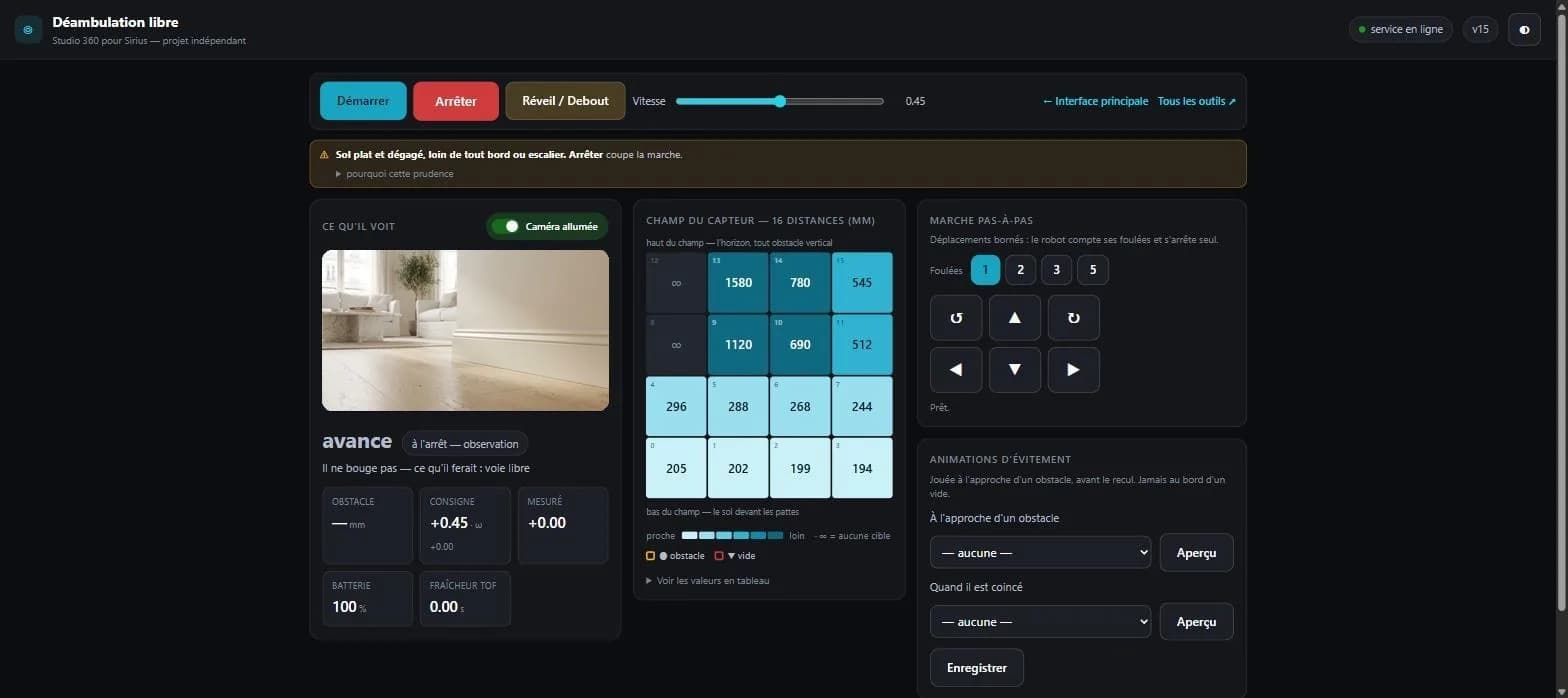
The Roaming tab lets the robot walk around on its own, avoiding obstacles, while the screen shows what it perceives. It is laid out in three columns, what it sees, what it measures, what it does: the distance sensor field live, a 4 × 4 grid, sixteen distances in millimetres coloured from nearest to farthest, the zones shouting "obstacle" or "void" ringed with a halo, then the robot's decision and its reason in plain words. It also carries a step-by-step walk, moves bounded in number of strides which the robot counts before stopping on its own, and a Wake / Stand button.
The distance sensor only exists on the on-board ROS graph, never on the WebSocket channel: the avoidance loop therefore runs on the robot, not on the PC. That node ships with the kit and drops onto the machine in one command. Until it is deployed, the tab still opens and explains what to do rather than staying silent.
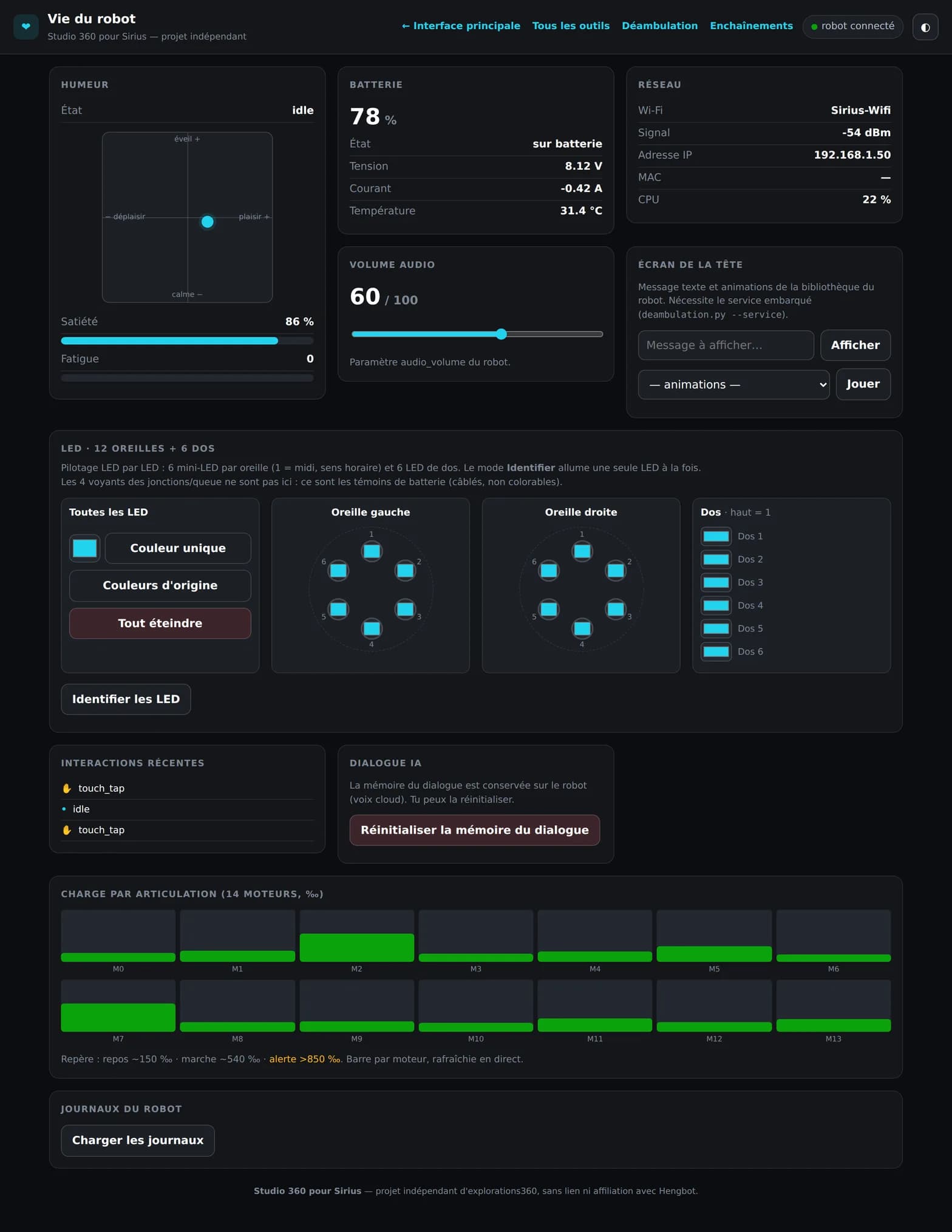
Robot life gathers what the machine says about itself and the settings that concern it: its mood as its own emotion engine computes it (pleasure, arousal, satiety, fatigue), read on the robot's own 0 to 100 scale, and those are the values that explain why it eventually lies down on its own; the audio volume; the LEDs, controllable diode by diode, two ears of six mini-LEDs in a ring and six back LEDs, with an Identify mode that lights only one at a time; the head screen, text message and animations from its own library; battery, network, the load of all 14 motors, touch interactions received, logs, and the dialogue memory.
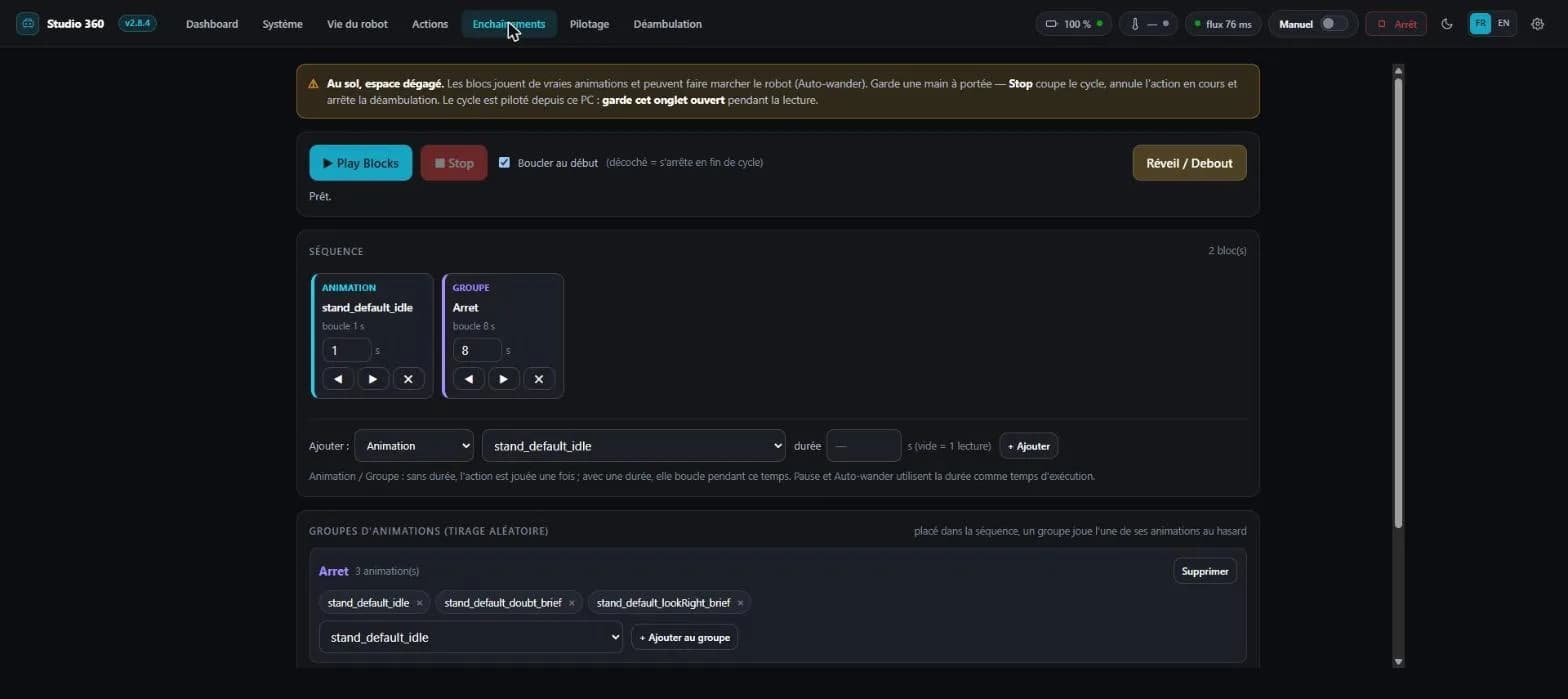
Sequences is a behaviour editor: you line up animations, randomly drawn groups (an "idle" group will play one of its animations at random), pauses and autonomous roaming blocks, then run the cycle, once or on a loop. Sequences are saved on the PC, exportable and importable as JSON. The new idea is the group: you describe a behaviour, not a fixed list.
Two buttons in the top bar must not be confused: Reset commands the stand-up from a lying posture, while Recovery, labelled "Get up", triggers the robot's own post-fall recovery mechanism. They are two different calls.
What 2.9.0 changes in the tool
A firmware banner on the Roaming tab. The tab checks the rangefinder on load and disables itself, with the date of the reading, when the sixteen channels come back invalid. It is an honest guard: the tool says what it can no longer do, instead of leaving the user to discover on their own a robot that will not move.
A "Face — animations" section in the Eyes tab: the library of animations present on the robot, uploading a GIF or a Lottie, position, size, loop and stop. It requires a passwordless SSH key, because those services live on ROS rather than on the REST network — exactly like hand tracking.
Four new routes in the local helper: GET /api/tof, GET /api/visage/animations, POST /api/visage/jouer and POST /api/visage/stop. The first one deserves a word: it returns the rangefinder grid with an availability verdict, and it always answers 200. The sensor being unavailable is information, not a failure of the tool.
What you need
- Python 3 installed, with "Add Python to PATH" ticked during installation. This is the number one cause of startup failures.
- A Sirius robot on the same Wi-Fi network as your PC.
- A recent browser, since video goes through WebRTC.
No dependency to install by hand: the launcher fetches fastapi, uvicorn, websockets and httpx on first run, once and for all, in about thirty seconds.
Connecting, in three steps
- Turn the robot on and check it is on the same Wi-Fi network as your PC. Its IP address shows on the head screen, Network menu.
- Unzip the archive and double-click
demarrer.bat. A console window opens, prints the version number, then your browser opens on the interface by itself. If it does not, go tohttp://127.0.0.1:8787. - Enter the robot's IP address in the interface, then click Connect. It is remembered: next time, one click on the recent address is enough.
To drive from a phone, run demarrer_telephone.bat instead of demarrer.bat, then open on the phone the address the console window prints, the phone being on the same Wi-Fi as the PC. "Add to home screen" installs the interface as an app, which then opens full screen. The bridge stays on the PC: it is the one talking to the robot.
Making the robot roam
The Roaming tab needs the avoidance node, which runs on the robot. It is in the archive, and a launcher handles it: double-click deambulation_robot.bat, enter the robot's address, and it drops the file and starts the service. All you need is the Windows OpenSSH client.
By hand, if you would rather see what happens, it is the same thing in three commands:
scp deambulation.py root@<ROBOT_IP>:/root/
ssh root@<ROBOT_IP>
python3 /root/deambulation.py --serviceStarted this way, the node exposes the sensor grid, its decision and its reason on port 8790, and accepts start, stop and speed: the bridge merely relays. The tab then comes alive. Until that program runs, it reads "service unreachable": it is the only missing piece. Read the "flat floor only" box above again before clicking Start, it is not decoration.
If it will not move
In order of frequency, and the first two causes are normalised speed and ground versus desktop mode:
- Legs move but it does not advance: it is in Desktop mode, switch to Ground in Modes and behaviour. Or the requested speed is too low: raise the slider.
- It reacts to nothing: either it is asleep, play an action to wake it, or autonomous mode is on and overriding your commands, turn it off.
- "Cannot reach the robot": check the IP address, and that PC and robot really are on the same network.
- "Python not found": reinstall Python with "Add Python to PATH" ticked.
- Seeing what happens: the bridge API is documented and testable on
http://127.0.0.1:8787/docs.
The kit comes with no warranty: it drives hardware that can fall or jam. The launchers are .bat files, so Windows; the Python bridge is cross-platform but has been tested nowhere else. A bug, a remark, a test result: write to us, that is how this page improves.